Buying Guide
Connectivity and latency
How a controller connects to your system affects responsiveness and compatibility. Bluetooth is convenient for mobile and some PCs — see our best bluetooth game controllers guide for Bluetooth-specific picks. 2.4GHz wireless (via a USB receiver) typically offers lower latency and more stable connections for competitive play, and wired/USB-C options eliminate wireless lag entirely.
- Look for multi-mode controllers that offer both Bluetooth and a dedicated 2.4GHz receiver if you switch between devices.
- Higher polling rates reduce input delay on PC—if low latency matters, check the controller’s polling rate and connection modes.
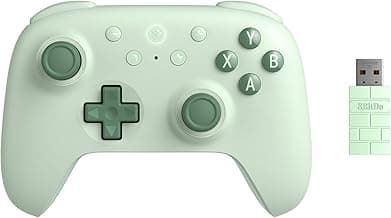
- Example: the 8BitDo Ultimate 2C supports modern low-latency modes for Windows and Android, making it a strong choice if responsiveness is a priority.
Ergonomics, size and controls
Comfort directly affects how long you can play without fatigue and how precisely you control in-game actions. For model comparisons focused on form factor and grip, check our best gamepads roundup rather than relying on photos alone.
- Try to find reviews or hands-on impressions for the controller’s comfort rather than relying on photos alone.
- Consider where extra buttons or paddles sit if you prefer more inputs without sacrificing hand position.
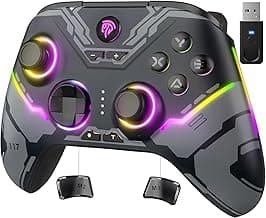
- For a balanced mix of features and comfort, the GameSir G7 Pro (Zenless Zone Zero Edition) is a useful example of a design focused on ergonomic play with competitive-friendly controls.
Battery life, charging and convenience
Battery life and charging method shape the daily experience. Controllers with quick USB-C charging or hot-swapable batteries reduce downtime. If you prefer wired options to avoid battery concerns entirely, see our best wired game controllers picks. Also consider whether the controller can be used wired while charging.
- Look for controllers that offer at least several hours of continuous play and a fast, standard charging port like USB-C.
- If you play on multiple platforms, check whether the controller maintains Bluetooth profiles while charging or needs re-pairing.
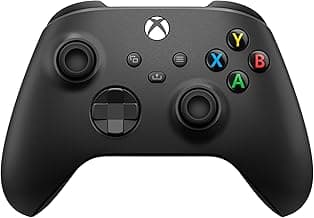
- If ecosystem compatibility and reliable wireless range matter, console-first controllers such as the Xbox Wireless Controller (Shock Blue) are worth considering for seamless console-to-PC workflows.
Features and customization
Customizable inputs, software support, and component quality let you tailor a controller to your preferences. For an overview across types and use cases, see our best game controllers guide. Remappable buttons, trigger deadzone tuning, macro support and onboard profiles are particularly useful for competitive and accessibility-focused players.
- Software and driver support: prefer controllers with well-reviewed companion apps for remapping and firmware updates.
- Hardware quality: Hall-effect or TMR sensors in sticks/triggers reduce drift and prolong usable life.
- Extra features like motion controls, trigger stops, or RGB are nice-to-haves—prioritize features you’ll actually use to avoid paying for extras you don’t need.
Build quality, warranty and long-term support
Durability and manufacturer support determine how long a controller stays reliable. Read user feedback about stick drift, button wear and how the company handles returns and firmware updates.
- Check the warranty length and what it covers; a solid warranty can offset a higher upfront cost.
- Look for reputable brands or models with proven component choices (Hall/TMR sensors, robust housings) when longevity matters.
- Community and firmware updates matter—controllers with active firmware support are more likely to receive bug fixes and new features over time.
FAQ
Which wireless game controller is best for PC and Android?
Look for native Windows and Android support, low-latency wireless modes (Bluetooth plus 2.4GHz or high polling rate), and reliable firmware updates. A controller with hall-effect sticks and configurable buttons will give better longevity and flexibility across titles. A compact example that covers both platforms and offers remapping and high polling is 8BitDo Ultimate 2C. For more PC-focused options and compatibility notes, consult our best pc game controllers list. It’s a solid pick if you want plug-and-play compatibility across PC and Android.
Are wireless controllers good for competitive gaming?
Yes—modern wireless controllers can be competitive if they use low-latency 2.4GHz modes or very high polling rates and quality sensors. Features to watch for include TMR or hall-effect sticks, hall triggers, and a dedicated dongle rather than Bluetooth alone. Some controllers advertise 1000Hz or higher polling and stable 2.4G links that approach wired performance. If absolute minimum latency matters, consider hybrid wired/2.4G models like the GameSir G7 Pro 8K, which targets pro-level responsiveness.
Can a single wireless controller work with Switch, Steam Deck, and PC?
Many controllers support multiple platforms but check whether they offer dedicated modes for each system so button mapping and gyro support behave correctly. You’ll want easy mode switching, USB-C charging, and firmware updates to keep compatibility current. Budget multi-platform options like the GameSir Nova Lite 2 often include Switch, Steam Deck and PC modes and are a practical choice for mixed setups. Always verify the exact compatibility list on the manufacturer page before buying to avoid surprises.
Is battery life or polling rate more important for casual gamers?
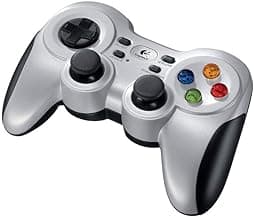
For casual play, battery life and comfort usually matter more than ultra-high polling rates. Longer battery life and stable Bluetooth give you hours of uninterrupted play and fewer recharges. Polling rate matters most in competitive or fast-twitch games; most casual sessions won’t notice differences above standard rates. If you prefer zero charging, wired controllers like the Logitech G F310 remove battery concerns entirely.
How do I pick a durable wireless controller for long-term use?
Prioritize build quality, proven sensor technology (hall-effect or TMR), and a reputable warranty when choosing for longevity. Remappable buttons, replaceable thumbsticks, and a strong charging/data port help extend usable life. Officially licensed or first-party controllers tend to have better support and sturdier parts; for example, the Xbox Wireless Controller is known for solid build and long-term reliability. Also check user reviews for reports on stick drift and button wear before buying.
Final Verdict
Top controllers separated themselves by connection stability, stick and trigger sensor quality, and overall build—those areas determined precision and longevity. Buyers should prioritize polling rate/wireless reliability, Hall/TMR sticks and triggers, ergonomics for long sessions, and remappable buttons for flexibility. The best-performing controllers combined low-latency wireless, durable sensor hardware, and comfortable, well-balanced shapes that stay responsive under heavy use.
🏆 Best Overall: Logitech G F310 Wired Gamepad Controller
💰 Best Budget: 8BitDo Ultimate 2C Wireless Controller — Hall Effect Joysticks
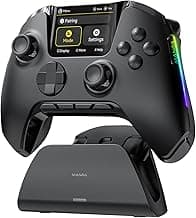
⭐ Best Premium: 8BitDo Ultimate 2 Wireless Controller — TMR Joysticks