Buying Guide
Panel type and color accuracy
Choose the panel technology that matches how you’ll use the monitor. IPS panels offer wider viewing angles and more consistent colors, which helps for streaming, content creation and competitive games where color and clarity matter. VA panels typically deliver higher contrast and deeper blacks, useful if you also watch movies. If color-critical work is a priority, look for advertised color coverage values (sRGB, DCI-P3) and consider factory calibration or a model aimed at professionals. See our guide to best premium ultrawide gaming monitors for models with factory calibration and wide color gamuts.
- Example: the CRUA 34-inch Ultrawide highlights 120% sRGB, making it a sensible pick when color consistency matters alongside gaming.
Resolution, refresh rate and pixel density
For ultrawide gaming, 3440 x 1440 (WQHD) is the sweet spot under $1,000 — it balances visual detail with achievable frame rates on modern GPUs. Refresh rate matters more for smoothness: 100–144Hz is a solid baseline, while 165–180Hz benefits fast-paced shooters and gives a noticeably smoother feel if your system can push the frames. Also consider pixel density: larger screens with the same resolution will have lower pixel density, which affects perceived sharpness at normal viewing distances. If you want a focused list of WQHD options, see our best 1440p ultrawide gaming monitors recommendations.
- Tip: If you want high frame rates and responsiveness, models like the KTC 34-inch Ultrawide with up to 180Hz provide a good balance of high refresh and WQHD clarity.
Adaptive sync, response time and input lag
Adaptive sync technologies (AMD FreeSync, NVIDIA G-Sync Compatible) reduce tearing and stutter when frame rates fluctuate. Look for low response times (1–4 ms) and explicit mentions of input lag if you’re competitive. Note that manufacturers report different response time metrics (GtG vs MPRT), so check reviews for real-world measurements when latency is critical.
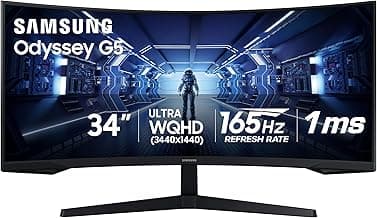
- Example: the Samsung Odyssey G5 34-inch supports FreeSync Premium and 165Hz, making it a solid runner‑up for smooth gameplay on a budget.
Connectivity, ergonomics and extra features
Prioritize the ports you need: DisplayPort is essential for high refresh rates at WQHD; HDMI bandwidth varies by version, so check compatibility. USB-C with power delivery is useful if you want a single-cable laptop setup. Ergonomics—height, tilt, swivel and VESA mount—affect comfort for long sessions. Additional features like PIP/PBP, built-in speakers, HDR support and reliable on-screen menus can improve daily use but vary in quality across models.
- Example: if USB-C power delivery or extensive split-screen options matter, consider the INNOCN 40-inch WQHD, which includes USB-C 90W and PIP/PBP functionality.
Size, curvature and desk fit
Ultrawide sizes commonly range from 34" to 49". A 34" 21:9 monitor is a versatile choice for most desks and provides a high pixel density at 3440 x 1440. Bigger 32:9 or 49" super‑ultrawides offer expansive horizontal workspace but require more desk depth and a powerful GPU to maintain high frame rates. Curvature (measured in radius like 1500R or 1000R) affects immersion—tighter curves wrap the field of view more but may feel overwhelming at close distances. Measure your desk and seating distance before choosing to avoid an awkward setup. Sim racers often prefer wider fields of view—see best ultrawide gaming monitors for sim racing for recommendations and size guidance.
- Practical check: sit where you game or work and measure distance to the front of your monitor; tighter curves and very wide screens benefit from slightly closer, centered seating.
FAQ
What is the best ultrawide gaming monitor under $1000?
The best pick balances a high refresh rate, WQHD resolution, a pronounced curve, and adaptive sync without breaking the bank. For a strong all-around choice you can get excellent gaming specs and ergonomic adjustments in a 34-inch ultrawide; a top example is the KTC 34-inch Ultrawide, which pairs 3440×1440 resolution with a high refresh rate and variable refresh support. Look for monitors with DisplayPort/HDMI inputs and VESA mounts so you can connect a PC and set up a monitor arm. If you need extra color accuracy or a larger canvas, consider stepping up to 40–49 inch models in the same price range.
Are ultrawide monitors good for competitive gaming?
Ultrawides offer a wider field of view, which can help situational awareness, but they also demand more GPU power to hit high frame rates at WQHD. If you prioritize responsiveness, choose a model with a 144Hz–180Hz refresh rate and low response time; many ultrawides like the Samsung Odyssey G5 emphasize fast refresh and aggressive curvature for immersion. Competitive players who favor maximum frames and minimal input lag sometimes stick to 16:9 240Hz panels, but a 165–180Hz ultrawide is a solid compromise for both visuals and speed. Make sure your PC can sustain the higher resolution before committing to an ultrawide for competitive play; our best ultrawide gaming monitors for pc article has picks optimized for desktop setups.
Which ultrawide monitor is best for both work and gaming?
For a mixed workflow look for a larger ultrawide with reliable color, built-in screen-splitting features, and handy ports like USB-C for laptop charging. Monitors that advertise PIP/PBP and USB-C power delivery make switching between editing spreadsheets, video work, and gaming seamless; the INNOCN 40-inch WQHD model is an example of a larger screen designed with those features in mind. Prioritize an IPS or high-quality VA panel if color accuracy matters, and choose a stand with tilt and height adjustments for comfortable long sessions. A monitor with HDR support and adaptive sync rounds out a flexible work-and-play setup.
Will my PS5 or Xbox Series X work properly with an ultrawide monitor?
Most console games are developed for 16:9 and won’t natively render in 21:9, so you’ll often see black bars or stretched images on an ultrawide unless a title explicitly supports ultrawide. Check the monitor’s HDMI version and the console’s output options—some newer monitors include HDMI 2.1 which better supports console frame rates and resolutions. If you want true ultrawide gameplay on consoles, look up whether specific games advertise 21:9 support before buying. For console-specific compatibility and monitors that work well with consoles, see best ultrawide gaming monitors for ps5. Otherwise, an ultrawide still works fine for single-screen console use but with potential letterboxing or cropping.
How much do panel type and color coverage matter for an ultrawide gaming monitor?
Panel type affects contrast, viewing angles, and color accuracy: IPS panels usually offer better colors and viewing angles, while VA panels deliver deeper blacks and higher contrast. If you also do content creation or color-critical work, pick a monitor with wide color coverage—many professional-focused ultrawides list high sRGB or DCI-P3 percentages; for example, the CRUA 34-inch claims expanded sRGB coverage aimed at creators. Gamers who only prioritize refresh rate can tolerate narrower color gamuts, but creatives should aim for accurate factory calibration or a model that supports hardware calibration. Balancing panel type, color needs, and refresh rate will get you the most useful ultrawide for both gaming and work.
Final Verdict
After testing the lineup of ultrawide gaming monitors under $1000, the strongest models stood out through a combination of native WQHD resolution, high refresh rates, low latency and reliable connectivity; weaker options sacrificed panel quality, motion handling or ports. Prioritize native 3440×1440 panels, 100Hz+ refresh, low response times, panel type (IPS/VA) and the ports or USB‑C power you need. The top performers all paired true WQHD, responsive motion performance and dependable color/port setups.
🏆 Best Overall: KTC H34S18S 34-inch Ultrawide 180Hz WQHD Curved Monitor
💰 Best Budget: Gawfolk 34-inch Ultrawide 165Hz UWQHD Curved Monitor
⭐ Best Premium: INNOCN 40-inch WQHD 144Hz Ultrawide Monitor USB-C 90W