Buying Guide
Resolution and aspect ratio: what to expect on PS5
Ultrawide monitors use a 21:9 aspect ratio (commonly 3440×1440) that gives a wider field of view than a standard 16:9 display. That wider view is excellent for PC racing, simulation and productivity, but console support is mixed: many PS5 games are developed for 16:9 and will either letterbox (black bars) or be cropped when running on an ultrawide panel.
When shopping, prioritize a monitor with good scaling and picture presets so 16:9 content still looks natural. A true 3440×1440 panel is ideal for PC use alongside your PS5, but if you need seamless native console support for every game, be prepared to accept letterboxing or look for titles that explicitly support ultrawide. If you primarily play on PC or want a dual PC/PS5 setup, see best ultrawide gaming monitors for pc for models optimized for native 21:9 gaming.
Refresh rate and input lag: balancing PS5 limits with future use
The PS5 can output very smooth frame rates for supported titles, but most console games target 60–120Hz. While ultrawide monitors advertise 144Hz, 165Hz or higher, high refresh rates are most meaningful on PC. For PS5 gaming focus on low input lag and fast pixel response (measured as MPRT or GTG) to reduce motion blur and input delay.
- Look for manufacturer specs that list low input lag or MPRT/OD times under 5–10ms for snappy console performance.
- If you also use the monitor for PC, a higher refresh panel gives more longevity—just don’t expect every PS5 game to make full use of 144Hz+. For a focused look at high-refresh 1440p panels that balance clarity and speed, check best 1440p ultrawide gaming monitors.
Connections and HDMI version: why HDMI 2.1 matters
HDMI version affects what the PS5 can deliver. HDMI 2.1 enables features like 4K at 120Hz, variable refresh rate (VRR) and higher bandwidth for richer color and HDR. For the best PS5 experience choose a monitor with HDMI 2.1 inputs and make sure the included cables support the bandwidth you need.
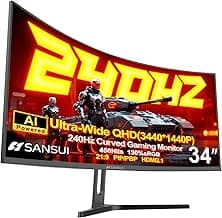
As an example of an ultrawide with modern connectivity, consider the SANSUI 34-Inch Curved Gaming Monitor, which lists HDMI 2.1 inputs—useful if you want the most flexible console setup and easier support for VRR/120Hz passthrough when supported by games.
Panel type, curve and ergonomics: choose for games and living-room viewing
Panel technology (VA, IPS, OLED) and curvature (1500R, 1800R, etc.) determine contrast, viewing angles and immersion. VA panels typically offer deeper blacks and better contrast for dark-room TV-style gaming, while IPS panels give wider viewing angles and more accurate colors for shared-screen play. OLED/QD-OLED panels provide the best contrast and motion clarity but at a substantially higher price. If budget isn't a concern and you want top-tier panels and features, see best premium ultrawide gaming monitors for premium picks.
- Curvature enhances immersion for single-player titles; steeper curves feel more enveloping but can exaggerate color/contrast shifts at very close viewing distances.
- Check stand ergonomics and VESA mounting options if the monitor will sit on a TV stand or be wall-mounted in a living-room setup.
Budget and value: finding a practical ultrawide for PS5
Avoid paying premium for features you won't use on PS5; if most of your gaming is on console, prioritize low input lag, good SDR/HDR handling and solid connectivity over ultra-high refresh rates. For mixed PC/console use, look for a balance of color, response time and HDMI 2.1 support.
For example, the Gawfolk 34" Ultrawide is positioned as a budget-friendly 3440×1440 option that can suit someone who wants ultrawide immersion for PC but still play the PS5 on the same screen without a large upfront cost. If you're watching costs, our best ultrawide gaming monitors under $1000 guide highlights value picks that balance features and price.
FAQ
Can I use an ultrawide monitor with my PS5?
Yes — you can connect an ultrawide monitor to a PS5 like any HDMI display, and the console will send a compatible signal. Most PS5 games and the system UI are designed for 16:9, so on a 21:9 panel you'll often see black bars or a centered 16:9 image rather than a true ultrawide view. Some monitors offer scaling or aspect-ratio options to avoid stretching, so check the OSD features before buying. If you expect native 21:9 support in specific games, verify those titles individually rather than relying on universal console behavior.
Does the PS5 support 3440x1440 (UWQHD) resolution?
Officially, the PS5 does not broadly support 3440x1440 as a native output, so most titles won’t render at UWQHD by default. When connected to a 3440x1440 monitor the PS5 will typically output a 16:9 resolution and the monitor will letterbox or scale the image. A few games and developers have added 21:9 support, but that's the exception rather than the rule. If native UWQHD is a must, prioritize PC gaming or check game-specific settings before buying an ultrawide for console-only use.
What monitor features matter most for PS5 gaming?
For PS5, prioritize HDMI 2.1 if you want the console’s highest-frame-rate and low-latency options, plus good input lag and HDR handling for better visuals. A solid color gamut and peak brightness help HDR look right, while adaptive sync is less critical since PS5’s VRR support is limited and game-dependent. If you want a strong all-around ultrawide pick that balances these needs, consider the SANSUI 34-Inch Curved (Best Overall). Also look for an easy-to-use OSD with aspect/scale controls so the monitor handles console signals cleanly.
Are ultrawide monitors worth it for console gaming compared to PC?
Ultrawide monitors can be very immersive, but the value depends on how you split time between console and PC. PC games and sims often offer native 21:9 support and will make full use of the extra horizontal view, while many console titles remain 16:9-limited and will show bars. If you mainly game on PC or play racing/flighting titles that commonly support ultrawide, the investment makes more sense—see our recommendations for racers in best ultrawide gaming monitors for sim racing. If you’re console-first, look for monitors with good scaling and features that still serve well for everyday 16:9 content.
How do I set up my PS5 for the best picture on an ultrawide monitor?
Start by using the monitor’s HDMI 2.1 port and the cable included or a certified HDMI 2.1 cable, then set the PS5’s video output to the highest resolution and RGB/full range that the monitor supports. In the monitor OSD, choose an appropriate aspect or scaling mode (1:1, center, or a dedicated console mode) to avoid stretching or unnatural scaling. Enable HDR on both devices and test a few games to confirm brightness and color settings; some monitors also offer game presets that help quickly optimize contrast and motion. For a budget example that handles basic setup and scaling cleanly, the Gawfolk 34 Ultrawide (Best Budget) is worth considering if you want simple console use without advanced extras.
Final Verdict
After comparing the top ultrawide options for PS5, the winners separated themselves through a clear mix of fast panels, modern console-friendly inputs and credible color/HDR handling—while weaker models skimped on one of those pillars. Prioritize HDMI 2.1 or low-latency HDMI, high refresh/fast response, accurate color gamut and a comfortable curve. The best-performing monitors consistently combine responsive panels, reliable HDR/color and flexible connectivity for both console play and PC use.
🏆 Best Overall: SANSUI 34-Inch Curved UWQHD 3440x1440 200Hz
💰 Best Budget: Gawfolk 34-Inch Ultrawide UWQHD 3440x1440 165Hz
⭐ Best Premium: CRUA 34-Inch Curved WQHD 3440x1440 165Hz