Buying Guide
Ergonomics and build
How a controller feels in your hands is the single biggest factor for long sessions. For an overview of strong options that balance comfort and performance, see best game controllers. Look for a shape that matches your grip (compact for smaller hands, fuller grips for larger hands), textured surfaces where you hold it, and a weight that feels balanced rather than heavy. Pay attention to button spacing and shoulder trigger shape—small differences can change comfort over hours of play.
- Try to test grip and button reach in person if possible.
- Wired controllers often feel lighter and simpler; wireless adds convenience at the cost of occasional weight from batteries.
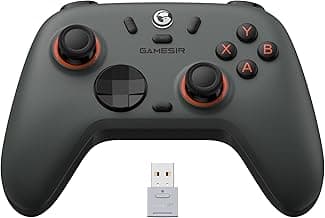
- Example: the GameSir G7 SE uses hall-effect stick hardware in a familiar layout that many players find comfortable for extended play.
Compatibility and connectivity
Verify platform support before you buy. Some controllers are designed for a single console, others work across PC, mobile and multiple consoles via Bluetooth, USB-C, or proprietary wireless. If Bluetooth is a priority for your mobile or PC setup, check our picks for best bluetooth game controllers. Wired plug-and-play controllers minimize pairing issues, while Bluetooth and native wireless options offer freedom but may require occasional firmware updates or adapters for full feature support.
- Match the controller to your primary platform (console model, PC OS, or mobile).
- Check connection options—USB-C for wired, Bluetooth for mobile/PC, or official wireless for console features.
- If you need cross-platform use, consider the PlayStation DualSense, which lists multi‑platform compatibility.
Input tech and responsiveness
For competitive play or precise inputs, internal hardware matters. Look for controllers with reliable thumbstick mechanisms, low-latency wireless or polling rates, and consistent trigger behavior. Hall-effect sticks and triggers reduce drift over time compared with cheaper potentiometers. Higher polling rates can lower input lag on PC, though real-world gains vary by setup—see our recommendations for best pc game controllers if you need PC-focused, high-polling options.
- Prefer hall-effect or TMR joystick designs if longevity and drift resistance are priorities.
- Consider a higher polling-rate or pro-grade controller if you play competitively.
- High-performance examples include the Razer Wolverine V3 Pro, which targets low-latency and remappable controls for advanced players.
Features and customization
Customizable controls—remappable buttons, back paddles, trigger stops, and swappable caps—let you tailor the controller to your playstyle. Official console controllers can be more limited, while third-party and pro controllers often include software or onboard memory to save profiles. Decide which features you’ll actually use to avoid paying for extras you don’t need.
- Look for onboard profile memory if you switch setups regularly.
- Check whether customization requires a PC app or can be done on the controller itself.
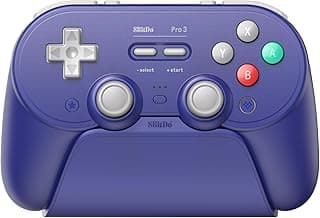
- For extensive mapping and hardware swaps, consider options like the 8Bitdo Pro 3.
Battery, durability and value
Evaluate battery type (replaceable AA vs. internal rechargeable), expected longevity, and overall build quality. Rechargeable batteries and USB-C charging are more convenient; replaceable batteries can keep a controller in service longer for some users. Also weigh warranty and brand support—cheap controllers can save money up front but may cost more over time if they fail.
- Decide whether you prefer rechargeable convenience or the quick swap of replaceable batteries.
- Consider the warranty and read reviews for reported longevity issues.
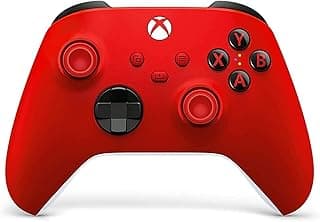
- For wireless-focused shoppers who want long battery life and modern connectivity, see our round-up of best wireless game controllers. For a solid budget-friendly choice with modern connectivity, the Xbox Wireless Controller (Shock Blue) is a common pick for everyday value.
FAQ
Which are the best standard controllers for most gamers?
For most players you want a controller with a comfortable shape, reliable sticks, and responsive triggers that works across consoles and PC. If you want a strong all-round pick that balances price and performance, consider the GameSir G7 SE. Sony’s DualSense and Microsoft’s Xbox Wireless controller are good alternatives if you prefer platform-native features or wireless play. Prioritize a familiar layout and build quality so you won’t need to relearn inputs mid-game.
Is a wired or wireless standard controller better for PC gaming?
Wired controllers typically offer lower latency and don’t need charging, which makes them a safe bet for competitive play and long sessions—our list of best wired game controllers highlights strong wired options. Wireless controllers are more convenient for couch gaming and mobile use, but you should check battery life and latency specs before buying. Many modern controllers support both wired and wireless modes, so you can switch depending on the situation. If online responsiveness matters most, choose wired for tournaments and wired-or-wireless for everyday use.
Can console controllers work on PC and mobile devices?
Yes—many current controllers are designed to work across platforms with Bluetooth or USB-C connectivity. For example, the DualSense supports PS5 features and can connect to PC and mobile, though some platform-specific features may be limited. Windows usually recognizes Xbox-style controllers natively, while PlayStation controllers may need driver support or Steam configuration. Always check compatibility notes and whether additional software is required for advanced features.
What features should I look for when buying a standard controller?
Look for reliable joystick sensors (hall-effect or TMR), responsive triggers, and comfortable ergonomics that match your hand size. Remappable buttons and back paddles are useful if you want more control without changing your grip, while a high polling rate benefits competitive players. Battery life and charging options matter for wireless controllers, and a 3.5mm jack or Bluetooth support improves headset compatibility. Finally, consider build quality and brand reputation to avoid early failure or drift issues.
Are third-party controllers safe and reliable compared to first-party options?
Third-party controllers vary, but many reputable makers deliver excellent value and features not found on first-party pads. Brands like 8BitDo and GameSir often offer advanced joysticks, remappable buttons, and cross-platform support at lower prices, while budget makers can be hit-or-miss. Read reviews for long-term reliability and check warranty policies before buying. If you prefer guaranteed compatibility and support, first-party controllers remain the safest choice.
Final Verdict
After comparing the field, the strongest controllers separated themselves by precise, low-latency inputs, durable hardware, and comfortable ergonomics—qualities that overcame minor feature differences. Buyers should prioritize stick/trigger tech (Hall/TMR), reliable wired or wireless connections, and a comfortable grip for long sessions. The top performers all delivered responsive controls, solid build, and straightforward platform compatibility.
🏆 Best Overall: GameSir G7 SE Wired Controller — Hall Effect Joysticks & Triggers
💰 Best Budget: XBOX Wireless Controller — Textured Grip, Bluetooth & USB-C
⭐ Best Premium: Razer Wolverine V3 Pro — 8K Polling & Up to 36 Hr Battery