Buying Guide
Suction and cleaning performance
Power and brush design determine how well a robot vacuum cleans carpets, pet hair and hard floors. Look beyond peak Pascal numbers—check for multi-stage suction modes, a combination of bristle and rubber brushes, and features designed to prevent hair tangles. Mopping additions are useful for hard floors but won’t replace a dedicated mop for heavy stains. For robots that handle both jobs well, see our best robot vacuums with mop.
- Tip: Choose a model with adjustable suction so the robot boosts power on rugs and conserves battery on hard floors.
- Tip: Look for edge- and corner-focused cleaning if you want fewer touch-ups along baseboards.
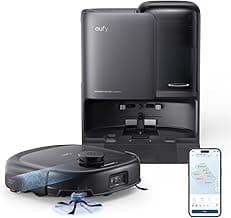
- Example: If you want a strong all-in-one performer, consider the eufy E25 as a reference for powerful suction combined with an integrated mop system.
Navigation and mapping
Good navigation means faster, more thorough cleaning and fewer stuck runs. LiDAR and SLAM-based mapping give the most reliable room layouts and allow precise zone cleaning, virtual no-go lines and multi-room scheduling. Camera-based systems can work well but expect differences in low-light or cluttered environments.
- Tip: If you need room-by-room cleaning or no-go zones, prioritize models with editable maps and multi-floor support.
- Tip: A slimmer profile (around 3" or less) helps reach under low furniture—confirm the robot’s height against your furniture clearance.
- Tip: Look for “resume after charging” or automatic multi-pass cleaning on large homes to ensure full coverage.
Battery life and real-world coverage
Battery specs matter most in relation to your home size. Manufacturers list run times, but actual coverage depends on suction level, mapping efficiency and floor type. Recharge-and-resume lets a robot finish larger jobs, and faster charging or higher-capacity batteries reduce interruptions. If you’re unsure what runtime suits you, check our best robot vacuums for home guide for size-based recommendations.
- Tip: For apartments and small homes, 60–90 minutes is usually enough; for larger homes, aim for 90+ minutes or reliable recharge-and-resume.
- Tip: Check whether the robot returns to the dock automatically and how long it takes to resume—this affects total clean time on multi-room jobs.
Maintenance and ongoing costs
Consider replacement filters, brushes, mop pads and, for self-emptying models, replacement dust bags. Smaller dustbins require more frequent emptying unless the robot has an auto-empty base. Mops that dry and self-wash reduce upkeep but can add to long-term maintenance. We review models with these systems in our best self washing robot vacuums roundup.
- Tip: Factor in filter and brush replacement intervals and approximate prices; genuine parts are often cheaper and last longer than generic knockoffs.
- Tip: If you have pets, prioritize tangle-free brush systems and larger bin capacity to cut down on daily maintenance.
- Tip: Read user reports about clogging and how easy the manufacturer makes access to common wear items—easy-to-remove components save time.
Smart features and convenience
App control, voice assistant support, schedules, and advanced cleaning modes make day-to-day use simpler. Premium conveniences—like automated mop washing/drying, hot-water cleaning cycles, or refined obstacle recognition—save time but increase price. For more high-end feature comparisons see best premium robot vacuums. Decide which smart features you’ll use regularly versus nice-to-have extras.
- Tip: If frequent app control and advanced automation are important, verify the app experience with recent reviews—software updates and map stability vary by brand.
- Tip: Voice control (Alexa/Google) is handy for hands-free starts and spot cleans; ensure the model advertises compatibility.
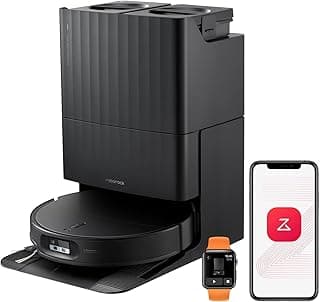
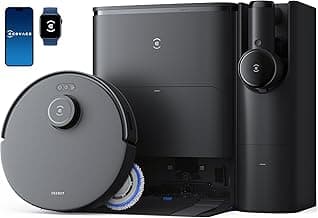
- Example: For high-end automated mop care and advanced obstacle avoidance as part of a broader smart experience, consider the roborock Qrevo S5V as a feature-forward example to compare against more budget-oriented picks.
FAQ
What features should I prioritize when shopping for the best robot vacuums under $1000?
Look for reliable navigation (mapping or LiDAR), strong suction, and a good brush design that handles edges and pet hair. Self-emptying docks and advanced obstacle avoidance reduce hands-on time and are worth considering if you want low maintenance. App controls, scheduling, and zone cleaning make day-to-day use easier and more precise. If you want an example that balances these features, the eufy E25 is a solid starting point to compare against. Always check how easy filters, brushes, and the dustbin are to clean before buying.
Are self-emptying bases worth the extra cost for robot vacuums under $1000?
Self-emptying bases reduce how often you touch the dustbin, which is helpful for busy households or allergy sufferers. They add convenience but also increase upfront cost and take up more floor space, so consider whether you need hands-free operation every week. Check whether the base uses replaceable bags or a washable container and factor that cost into your decision. Maintenance is still required—filters and brushes need regular attention even with an auto-empty dock. If you’re unsure, try a model with a manual bin first to see how much emptying you actually do. If budget is a concern, start with our best budget robot vacuums list.
Which robot vacuum under $1000 is best for pet hair?
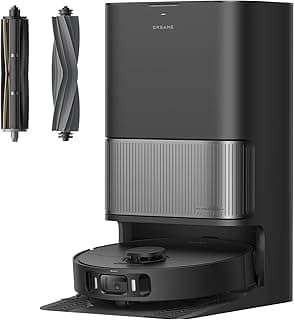
For pet hair you want a model with strong suction, a tangle-free brush system, and side brushes that pull hair from edges and corners. Look for brush designs labeled “zero-tangle” or edge-expansion brushes that lift hair away from baseboards. Mapping and carpet detection help the robot apply extra suction where pet hair accumulates. A good example to consider is the eufy C10, which highlights features geared toward pet owners. Regular filter and brush cleaning will keep any model working at peak performance for pet hair pickup.
How long do robot vacuum batteries typically last, and how can I extend runtime?
Battery life varies by model and usage, so always check the manufacturer’s stated runtime and charging behavior before you buy. Factors that shorten runtime include high-suction modes, frequent starts and stops, and cleaning thick carpets. To extend effective runtime, keep brushes and wheels free of hair, run regular scheduled cleans instead of long deep cleans, and use eco or auto modes when possible. Many modern robots also resume cleaning after recharging, so long jobs can be split across charging cycles. Replacing batteries or servicing the robot when performance drops will also help maintain runtime over the long term.
Can robot vacuums under $1000 also mop well enough to replace manual mopping?
Most robot mops are designed for light maintenance—picking up surface dust and light marks—not heavy-duty scrubbing or grout cleaning. Hybrid models with water tanks and mop functions can keep floors looking cleaner between manual mops, and advanced units offer features like mop lifting for carpets or auto wash/dry for the mop pad. If you need deeper cleaning, plan to supplement the robot with occasional manual mopping or a dedicated floor cleaner. For a high-end hybrid example, consider the roborock Qrevo S5V, which focuses on enhanced mopping features alongside vacuuming. Always follow manufacturer guidance on cleaning solutions and mop maintenance to avoid damaging the robot.
Final Verdict
After testing the field across price points, the strongest robot vacuums stood out for reliable navigation, consistent suction, low-maintenance docking, and effective mopping where offered. Weaker options fell short on mapping accuracy, obstacle handling, or recurring upkeep time. Prioritize mapping/navigation, suction power, battery life, and a self-emptying or easy-maintenance base—these features drive real-world convenience. The best performers combined precise mapping, durable brushes/rollers, and simple app controls for repeatable, hands-off cleaning.