Buying Guide
Suction, brushes, and pet-hair handling
For floors and low‑pile carpets you’ll want a machine that can actually pick up debris instead of just spreading it around. Look beyond marketing numbers: check for a combination of strong suction and a well-designed main brush (rubber or hybrid bristles) plus side brushes that reach edges without throwing dust around. Anti‑tangle brush designs are useful if you have pets or long hair. For broader model comparisons, see our best robot vacuum mop combos guide.
- What to look for: an all‑purpose main brush, clear mention of anti‑tangle or dual‑brush systems, and a suction system described for pet hair or "power‑lifting" debris pickup.
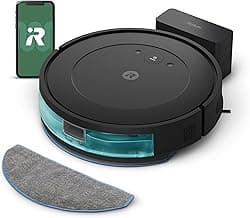
- Example: the iRobot Roomba 105 Combo is marketed with intense suction and a cleaning system tuned for everyday debris — a good starting point when evaluating pickup performance.
- Tip: read reviews on pet‑hair performance specifically; models with dedicated anti‑tangle features tend to need less frequent unclogging.
Mopping system and carpet avoidance
Mop systems vary widely: passive cloth pads, oscillating/spinning mops, and models that spray controlled amounts of water. Decide whether you need light freshening for sealed hard floors or a true scrub for dried spots. Crucially, look for reliable carpet detection and carpet‑avoid settings so the robot won’t wet your rugs. If you’re comparing mopping styles, check our best robot vacuums with mop guide for deeper feature breakdowns.
- Consider adjustable water flow or multi‑level mop intensity so you can tailor cleaning by surface.
- Check whether the mop module is removable and machine‑washable to simplify upkeep.
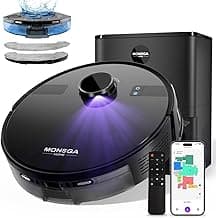
- Example: if you’re new to combo robots, the feature set on the MONSGA 7000Pa model (tangle‑free mop and Lidar navigation) is a practical balance of mopping and vacuuming features for hard floors and rugs.
Navigation, mapping, and no‑go zones
Good navigation reduces missed areas and pointless collisions. LiDAR and PreciSense LiDAR systems give reliable room maps and better accuracy around furniture, while camera‑based or infrared systems can be cheaper but less consistent in low light. Multi‑floor mapping, editable no‑go zones, and room naming in the app are great conveniences if you have a complex layout.
- Choose LiDAR or proven SLAM mapping if you want fast, repeatable coverage and the ability to set virtual barriers.
- Look for "resume cleaning after charging" and room‑by‑room scheduling if you want tailored, hands‑off routines.
- If privacy is a concern, check whether the device uses cameras for mapping or relies on LiDAR/infrared only. For models with advanced app features and mapping, see our best smart robot vacuums roundup.
Battery life, runtime, and real‑world coverage
Runtime matters when you have large open areas. Manufacturers often quote maximum minutes under ideal conditions; real coverage depends on suction mode, navigation efficiency, and how many obstacles it must navigate. Models that advertise "recharge and resume" can finish large jobs in multiple legs rather than requiring a single long battery run.
- Estimate cleaning time by comparing your floor area to a model's stated runtime; compact apartments tolerate shorter runtimes better than large houses.
- Look for recharge‑and‑resume and efficient mapping so the robot picks up where it left off instead of restarting an incomplete job.
- Tip: higher‑power modes drain battery faster — a balance between suction level and runtime is often the most practical choice.
Dustbin, self‑emptying stations, and maintenance
Emptying frequency and ease of maintenance affect long‑term satisfaction. Self‑emptying bases reduce emptying chores — but they add footprint and occasional bag or filter replacements. Also consider filter type (HEPA vs standard), dustbin size, and how easy it is to access brushes and sensors for cleaning.
- If you want low maintenance, prioritize models with multi‑week self‑emptying claims and accessible consumables.
- Check replacement part availability (bags, filters, brushes) and how expensive or frequent they are to replace.
- Example: the MONSGA 90‑Day Self‑Emptying model highlights extended self‑empty intervals and LiDAR mapping, which can be helpful if you prefer minimal hands‑on upkeep.
FAQ
What features should I prioritize when shopping for the best robot vacuum mop combos under $500?
Focus first on navigation (LiDAR or reliable sensors), suction power, and separate mop modes so the robot avoids wetting carpets. Look for mapping and zone-cleaning in the app so you can block off areas or schedule rooms independently. Battery life and recharge-and-resume are important if you have large spaces, and a self-emptying dock is a big convenience if you hate frequent maintenance. Finally, check brush design and anti-tangle claims if you have pets or long hair.
Can robot vacuum mop combos under $500 handle pet hair well?
Yes—many models in this price range are tuned for pet hair with stronger suction and anti-tangle brush systems. A model with an auto-empty dock and “power-lifting” suction reduces how often you touch hair and debris, which helps in busy pet homes. If you want a solid all-rounder example, consider the iRobot Roomba 105 Combo, which advertises intense suction and an AutoEmpty dock. Still, regular brush cleaning and spot checks will keep performance consistent over time.
How long do batteries last on these robot vacuum mop combos under $500?
Run times vary by model and cleaning mode, but many budget-to-midrange combos offer roughly 90 to 180 minutes per charge. For example, some machines advertise about 150 minutes on a single run while others list 180 minutes for larger batteries. Most robots will return to the dock to recharge and then resume where they left off, so battery limits rarely stop a full-house clean. Keep in mind mop use can slightly shorten runtime compared with vacuum-only cleaning. We also review runtimes in our best robot vacuums under $500 article.
Are self-emptying docks worth the extra cost for under-$500 robot combos?
Self-emptying docks add convenience because they cut down how often you must empty the bin—some models promise weeks or even months between bag changes. They do increase the upfront cost and take up more floor space, and you’ll have a small recurring expense for replacement bags or filters. If you want minimal hands-on maintenance, a unit with a long-lasting auto-empty system is worth it; a good example is the MONSGA 90-Day Self-Empty. For tight budgets or tiny homes, a non–self-empty model might be the smarter choice.
Can I control these robot vacuum mop combos with my phone or voice assistants?
Most modern combos under $500 offer app control for scheduling, map editing, and custom cleaning modes, and many support voice assistants for basic commands. Look for models that advertise app/remote/voice control if smartphone convenience is important to you. If you want a beginner-friendly example with app and voice support, consider the MONSGA Beginner Combo. Always check the app reviews to ensure the companion software is responsive and regularly updated.
Final Verdict
After comparing the top robot vacuum‑mop combos under $500, the strongest units separated themselves with reliable navigation, consistent suction, and maintenance‑saving features like self‑emptying or long runtimes; weaker options often struggled with mapping, tangle-prone brushes, or poor mop control. Prioritize accurate mapping (LiDAR or proven sensors), sufficient suction for your floor type, anti‑tangle brushes for pet hair, app control and scheduling, and a self‑emptying or large dust bin. If you’re focused on price, see our best budget robot vacuums recommendations. The best performers consistently combined accurate mapping, durable suction, and low-maintenance features that save time.
🏆 Best Overall: iRobot Roomba 105 Combo AutoEmpty Robot Vacuum & Mop
💰 Best Budget: MONSGA 7000Pa Lidar Robot Vacuum & Mop
⭐ Best Premium: MONSGA 90-Day Self-Emptying 8000Pa Robot Vacuum & Mop