Buying Guide
Compatibility & platform
Start by matching the controller to the system you actually use. Some music game controllers are built for consoles (Xbox, PlayStation), others target PC/Mac or mobile devices, and a few are purpose-built MIDI controllers for music production software. Check whether a controller uses a standard USB HID profile, requires a proprietary dongle, or needs drivers or an app on your platform.
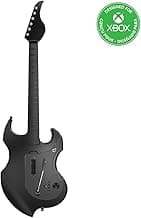
- If you plan to play on Xbox or Windows, look for officially licensed hardware to avoid connectivity problems — for example, the PDP RIFFMASTER is designed for Xbox consoles and Windows PCs.
- For mobile use, confirm phone mounting or Bluetooth support and whether the controller supports the specific games or apps you want to play.
For Bluetooth and dongle-based options, see our best wireless music controllers.
Controller type & play style
Decide which form factor fits your play style: guitar-shaped controllers for rhythm games (see our best guitar controllers), pad/drum controllers for beat-based titles, DJ-style decks for mixing sims (see our best dj game controllers), or compact MIDI keyboards and pad controllers for creating music. Your choice should reflect whether you want a fun game accessory, a practice tool, or a real production device.
- For someone who wants a versatile production-capable controller that also works well with rhythm tools and DAWs, a compact MIDI controller like the Akai MPK Mini MK3 can be a strong pick.
- If your focus is casual gameplay, simple plug-and-play guitar or drum-style controllers are often easier to set up and more durable for frequent button mashing.
Build quality & ergonomics
Comfort and durability matter because many music games involve long sessions and repeated button presses. Look for solid construction, comfortable grips and straps (for guitar controllers), and well-spaced buttons or pads. Pay attention to pad feel—velocity-sensitive pads are better for expressive playing, while stiffer buttons often last longer for game use.
- Ask whether parts like straps or thumbsticks are replaceable, and read reviews for reports of premature wear or unresponsive buttons.
- If you’re buying for a child, prioritize rounded edges, light weight and non-toxic materials alongside age-appropriate controls.
Features & software integration
Evaluate the control surface and any bundled software. Useful features include assignable knobs/pads, built-in audio interfaces, touch-sensitive jog wheels, and software bundles that add value. Native integration with popular music or DJ software can save setup time and give you more creative options beyond gaming.
- The Hercules DJControl Starlight is an example of a compact DJ controller that includes jog wheels, a built-in sound card and a software starter pack, which is helpful if you want to transition from game-style play to real mixing.
- For MIDI controllers, check whether the unit offers assignable controls and preset templates for popular DAWs or rhythm tools.
For devices that bridge gaming and production, see our best midi game controller.
Connectivity, battery & portability
Consider where you’ll use the controller. If you need something for travel or mobile setups, look for compact designs, pass-through charging and long battery life. For home use, wired USB connections provide the lowest latency and simplest power requirements, while wireless and Bluetooth models improve freedom of movement at the cost of potential lag or pairing issues.
- Rechargeable batteries and a reliable dongle can make wireless controllers more convenient, but always verify manufacturer battery-life claims and whether replacements are easy to source.
- When portability matters, prioritize controllers with a small footprint, protective cases, and robust build quality to survive transport.
If you prefer wired setups, check our best usb music controllers.
FAQ
Which music game controller is best for beginners?
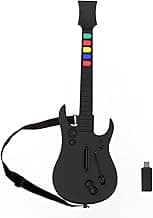
Beginners should look for a simple, plug-and-play design with clear button labels and a comfortable strap. The DOYO Wireless Controller is a purpose-built starter option for Guitar Hero–style play on PC and PS3, offering a familiar five-button layout and an included strap for comfortable practice. Wireless operation keeps cables out of the way, and many beginner controllers are affordable so you can try the hobby without a big investment. If you plan to play on modern consoles, double-check platform compatibility before buying.
What features should I consider when choosing the best music game controller?
Prioritize platform compatibility so the controller works with your console, PC, or mobile device out of the box. Check the connection type (USB, Bluetooth, or wireless dongle), expected latency, and whether the unit is rechargeable or uses replaceable batteries. For controllers used in production, look at pad sensitivity, knob or fader assignability, and any bundled software. Finally, factor in size and build quality if you plan to travel or play often.
Are wireless music game controllers reliable for PC and consoles?
Wireless reliability depends on the connection method and the controller's design; dedicated dongles and officially licensed devices often provide a steadier signal than generic Bluetooth. Models with rechargeable batteries and strong vendor support tend to be easier to keep updated and working across systems. For example, the PDP RIFFMASTER is an officially licensed wireless guitar controller for Xbox and PC that many users find straightforward to set up. As with any wireless gear, test performance in your usual play area to check for interference or dropouts.
Can I use a MIDI pad or keyboard as a controller for rhythm games?
MIDI pads and keyboards are built for music production, so they don't natively act like game controllers in most rhythm titles. On PC it's possible to map MIDI messages to keyboard or controller inputs using third-party software, but that adds setup complexity and may introduce extra latency. If you want a hybrid setup, consider keeping a compact MIDI device like the Donner pad or Akai MPK for production and a dedicated game controller for gameplay. For most players, purpose-built game controllers offer a smoother, plug-and-play rhythm gaming experience.
What's the most compact music game controller for travel or mobile play?
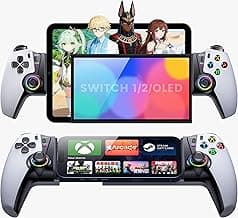
Look for small, lightweight devices with Bluetooth and pass-through charging so you can play while keeping the battery topped up. The GameSir Pocket Taco is a compact vertical mobile controller with Bluetooth and a built-in battery designed for on-the-go sessions. Another option is the Hercules DJControl Starlight, a pocket USB DJ controller that fits easily in a bag for laptop practice. Choose a model that matches your phone or laptop specs and fits comfortably in your travel kit.
Final Verdict
After testing the field, the strongest music game controllers stood out for low latency, responsive controls, and reliable build quality—weak options often felt imprecise or poorly mapped. Prioritize responsiveness (pad/joystick accuracy), platform compatibility, and a clean software/driver experience; battery life and portability matter if you play on the go. The best-performing controllers combined precise input, solid construction, and straightforward setup, delivering consistent performance across games and systems.
🏆 Best Overall: Akai MPK Mini MK3 25-Key USB MIDI Controller
💰 Best Budget: Hercules DJControl Starlight Pocket USB DJ Controller
⭐ Best Premium: The Learning Journey On The Go Game Controller Toy