Buying Guide
Keybed type and key count
Decide how much keyboard you actually need before picking a controller. Smaller 25‑key units save space and are great for sketching ideas and mobile setups, while 49 or 61 keys give you enough range for two‑handed playing and more realistic piano voicings. Pay attention to key action (synth‑action, semi‑weighted, or fully weighted) and whether the keys are velocity‑sensitive—these affect feel and expressiveness.
- 25–37 keys: best for beatmakers, tight desks, and portability.
- 49–61 keys: better for performing, arranging, and playing full passages.
- Key action: synth‑action for fast playing, semi‑weighted for more heft, fully weighted for piano feel.
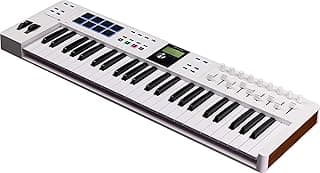
- Example: If you need a full‑sized 61‑key setup with a comprehensive software bundle, consider the Arturia KeyLab Essential mk3.
Controls and performance features
Look beyond keys. Assignable knobs, faders, pitch and mod wheels, aftertouch, arpeggiators, and built‑in sequencers let you perform and shape sounds without reaching for a mouse. Think about how you plan to work in your DAW: do you need quick mapping, hands‑on automation, or expressive modulation controls? For controllers designed around live performance and sequencing, see best midi game controller.
- Assignable encoders/faders: useful for mixing and plugin tweaking.
- Pitch/mod wheels and modulation options: important for live expression and synth playing.
- Arpeggiators/sequencers: speed up idea generation and performance workflows.
- Example: For a 49‑key controller with assignable controls and traditional pitch/mod wheels, the M‑Audio Keystation 49 MK3 is a practical runner‑up choice.
Pads, encoders and DAW/hardware integration
If you produce beats, sample, or trigger clips, drum pads and quick transport/clip controls can be essential. Look for responsive, velocity‑sensitive pads and software or template integrations for your DAW. Encoders with visual feedback (LED rings or multicolor pads) make parameter tweaking clearer in the heat of a session.
- Pad quality: velocity and aftertouch on pads matter for dynamic programming. If pads are a primary concern, check our best drum controllers roundup for pad‑focused recommendations.
- DAW templates and auto‑mapping save setup time—check which controllers offer tight integration.
- Multicolor pads and displays help you see pad/zone status at a glance.
- Example: For multi‑color pads and a compact control surface aimed at producers, the Arturia MiniLab 3 is a strong budget‑minded option.
Connectivity and compatibility
Match the controller’s connections to your setup. USB class‑compliant devices work plug‑and‑play with most computers and many mobile devices, but if you rely on older gear you may need MIDI DIN outputs. For a deeper look at USB‑class options and compatibility considerations, see best usb music controllers. Consider USB‑C for modern devices, Bluetooth for wireless setups, sustain pedal inputs, and extra outputs (CV/Gate) if you use modular hardware.
- USB vs USB‑C: USB‑C is more future‑proof for newer laptops and tablets.
- Bluetooth: convenient for on‑the‑go use, but expect some latency tradeoffs depending on the implementation.
- MIDI DIN/CV/Gate: required if you control outboard synths or modular rigs.
- Driver support: prefer class‑compliant devices or check manufacturer drivers for your OS and DAW.
Portability, build quality and software bundle
Balance portability and durability. Lightweight plastics are fine for travel, but metal‑reinforced chassis or robust knobs survive heavy use. Also value the included software—many controllers ship with synth libraries, DAW lite versions, or training resources that increase out‑of‑the‑box value.
- Weight and footprint: make sure it fits your desk or gig bag and that you’ll actually use all the features you pay for.
- Build: check reviews for key longevity, pad durability, and encoder reliability.
- Software bundles: a good suite can save you money and speed up workflow—look for DAW compatibility and included instrument libraries.
- Practical tip: if you move often, prioritize bus‑powered, compact units; if studio permanence matters, favor sturdier construction and full‑size keys.
FAQ
What are the best keyboard music controllers for beginners?
For beginners look for a compact 25-key controller with velocity-sensitive keys, a few pads, and basic knobs so you can learn performance and production workflows without a big upfront cost. An affordable option that covers those bases and pairs with included software is the M-VAVE 25-Key Controller, which also offers Bluetooth for wireless use. Start with something portable and focus on playability and build quality rather than advanced features you won’t use yet. Upgrading later to a larger controller is easy once you know which controls you need most.
Which MIDI keyboard is best for producing electronic music?
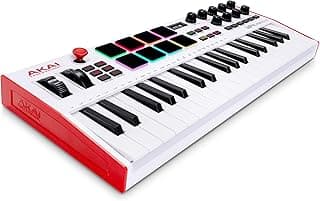
Electronic producers usually want responsive pads for drums, assignable knobs for effects, and a compact layout for sketching ideas quickly. The Akai MPK Mini MK3 is a popular pick because it combines 8 backlit pads, 8 knobs, and a compact keybed, making sound design and beat-making more efficient. If you prioritize performance controls over keys, look for models with good pad feel and solid mapping to your DAW. Also consider whether you need Bluetooth or standalone sequencing, depending on your workflow. For hybrid devices that blur the line between controllers and performance interfaces, our best music game controller guide highlights a few unconventional picks.
How many keys do I need on a MIDI controller?
The number of keys depends on how you play and produce: 25 keys are great for sketching and live electronic sets, 49 keys are a versatile middle ground, and 61+ keys suit players who need full-range piano parts. If you mainly make beats and synth lines, a 25-key controller is usually enough and keeps your setup portable. Pianists or those composing fuller arrangements will benefit from 61 keys or more to avoid constant octave switching. Consider whether weighted keys matter for your style before choosing size.
Do I need pads, knobs, and wheels on a controller?
Pads, knobs, and wheels each solve different tasks: pads are invaluable for finger drumming and launching clips, knobs are essential for real-time parameter control, and wheels add expressive pitch/modulation control. If you mainly sequence and produce, prioritize pads and a handful of encoders; wheels are more important for expressive keyboardists. Many budget controllers include a useful set of pads and knobs without driving up cost, so pick the controls that match your production habits. You can always expand with MIDI controllers or control surfaces later as your needs grow.
Can I use a MIDI controller wirelessly with my computer or iPad?
Yes—some controllers offer Bluetooth MIDI for wireless use with tablets and computers, but wired USB connections are still the most reliable with lower latency. If you’re specifically researching cordless models and latency tradeoffs, our best wireless music controllers guide covers current wireless implementations. If you plan to use an iPad, check for class-compliant USB-C or Lightning compatibility and whether the controller supports Bluetooth MIDI on iOS. Wireless setups are convenient for sketching and live performance, but test latency and range before committing to a critical session. For studio work, many producers prefer a wired connection to avoid dropouts and ensure consistent MIDI timing.
Final Verdict
The strongest keyboard controllers combined dependable key feel, responsive pads and knobs, and useful bundled software — while weaker models often cut corners in control layout, build quality, or usable software. Buyers should prioritize key count/action, velocity-sensitive pads, assignable controls, and reliable connectivity (USB or Bluetooth) to match their workflow. The top performers share intuitive layouts, durable construction, and software that lets you start producing quickly.
🏆 Best Overall: Akai Professional MPK Mini MK3 — 25-Key USB MIDI Controller, 8 Pads & 8 Knobs
💰 Best Budget: Arturia MiniLab 3 — 25-Key MIDI Controller with 8 Multi-Color Pads
⭐ Best Premium: Akai Professional LPK25 — 25-Key USB MIDI Keyboard with Arpeggiator