Buying Guide
Compatibility and platform support
First confirm which system(s) you want to use the controller with: Xbox, PlayStation, Nintendo Switch, Windows PC (including Clone Hero), or a mix. Some controllers are officially licensed for specific consoles and offer plug-and-play support, while others rely on USB dongles or third-party drivers for PC and mobile use. If you need seamless console integration, look for models that explicitly list your platform.
- Check packaging and product pages for explicit platform compatibility.
- For PC play, verify whether the controller is supported by Clone Hero or requires a USB receiver.
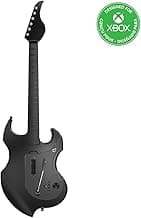
- Example: the PDP RIFFMASTER Wireless Guitar Controller is an example of a controller with official Xbox/Windows support, which reduces setup headaches on those platforms.
Connectivity, latency and power
Decide between wired and wireless based on responsiveness and convenience. Wired controllers avoid latency and battery concerns but limit movement. Wireless options use Bluetooth or proprietary USB receivers; a dedicated receiver usually offers lower latency than generic Bluetooth. Also consider battery type—built-in rechargeable batteries are more convenient than disposable AAs.
- Wired: simpler setup, lowest latency, no batteries.
- Wireless USB receiver: good balance of range and responsiveness for rhythm games.
- Bluetooth: convenient for mobile devices but can introduce latency on some setups.
- Rechargeable battery vs AAs: rechargeable is more convenient but check battery life and charging method.
For a broader comparison of wireless models, see best wireless music controllers.
Controls, fret layout and playability
Different controllers emulate different game generations and use varying fret/button layouts. Most modern controllers use five frets, but feel, spacing and button travel vary by model. Evaluate the strum bar, whammy bar, tilt sensors and any additional buttons (start/select/home) you’ll use often. Ergonomics—neck thickness, fret button spacing and strum resistance—affect how comfortable the controller feels during long sessions.
- Try to find hands-on reviews or video demos to judge button feel and spacing.
- Look for a responsive strum bar and a whammy bar that doesn’t stick or feel flimsy.
- If you plan to play competitively on PC, prioritize low-latency inputs and consistent button action.
Build quality, strap comfort and durability
Game controllers take a lot of physical wear—strumming, banging and repeated button presses—so durable construction matters. Check materials for the body and neck, how the strap attaches, and whether the strap is adjustable and comfortable. Heavier boards can feel sturdier but may be tiring over long sessions; balance and weight distribution are important.
- Look for reinforced strap mounts and adjustable straps to avoid mid-song slips.
- Plastic finish and paint quality can indicate long-term wear resistance.
- Read user reviews for common failure points like loose fret buttons or failing strum bars.
Features, extras and overall value
Decide which extras matter: RGB lighting, audio jack for pass-through headphones, adjustable straps, included dongles, or bundled software. These add convenience but also affect price. Compare feature sets against your budget to find the best value for the way you play.
- Audio jack lets you monitor game audio directly through the controller—handy for split-screen or party play.
- RGB or cosmetic extras are fun but not essential for performance.
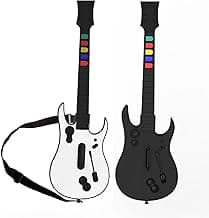
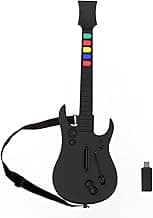
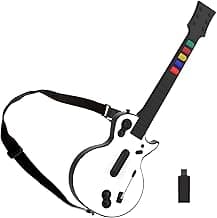
- Budget options can offer solid playability; for example, the NBCP Wireless Guitar Hero Controller is often cited as a lower-cost choice for PC and PS3 setups.
- Match features to your priorities: longevity and low latency for serious players, extras and styling for casual or party use.
On a tight budget, check our best budget guitar controller guide for inexpensive but reliable picks.
FAQ
Which guitar controller is best for Xbox and PC?
The PDP RiffMaster is our top pick if you need a controller that works smoothly across Xbox and Windows PCs. It’s officially licensed for Xbox platforms and also supports Windows 10/11, so compatibility is straightforward. It includes features like a rechargeable battery and an audio jack that make it convenient for casual play. If you want a reliable all-around option, the RiffMaster is a solid choice to consider: PDP RiffMaster.
What’s the best budget guitar controller for Clone Hero on PC?
If you’re mainly playing Clone Hero and want a low-cost option, look for a wireless controller that includes a USB dongle for plug-and-play PC use. The NBCP Wireless controller is positioned as a budget-friendly pick with that kind of dongle support, which keeps setup simple. Budget controllers can sacrifice build quality, so check return policies and reviews before buying. For most newcomers on a tight budget, a wired or dongle-equipped wireless unit will give the best value: NBCP Wireless Guitar Controller.
Are guitar controllers a good option for beginners learning rhythm games?
Yes—guitar controllers are a friendly entry point for rhythm games because they mimic a simple guitar layout without any real musical skill required. Beginners should prioritize a solid five-fret layout, a comfortable strap, and straightforward connectivity (wired or a reliable USB dongle). Durability matters more than premium features when you’re just starting, so avoid overpaying for extras you won’t use. Also check platform compatibility to ensure the controller works with the game and system you plan to use. If you want recommendations for entry-level gear, see best beginner guitar controller.
Can I use a guitar controller with Switch, iPhone, or Android devices?
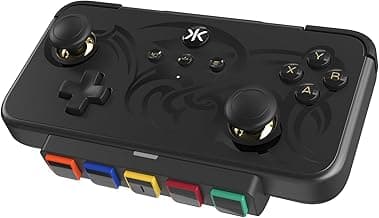
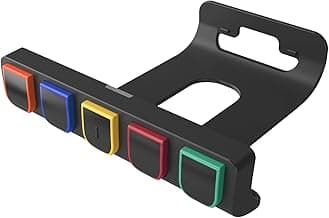
Some modern controllers are designed for multiple platforms, including Switch and mobile devices, but compatibility varies by model. The CRKD NEO S is an example marketed for multi-platform use including PC, iPhone/iPad, Android, and Nintendo Switch, so it’s worth checking if cross-device play is your priority: CRKD NEO S. Always confirm the connection method (Bluetooth vs. USB dongle) and whether adapters are needed for your specific device. If you plan to switch between consoles and phones frequently, choose a controller with explicit multi-platform support and easy pairing. For device-specific suggestions and cross-platform options, see best music game controller.
How do I choose a guitar controller for long parties and local multiplayer?
For party use you’ll want controllers with reliable wireless performance, good battery life, and sturdy straps so they hold up during energetic play. Look for low-latency connections and simple pairing procedures to avoid setup delays between rounds. Durability and easy-to-replace parts (like straps or battery covers) are more important than fancy lighting at parties. Finally, make sure the controller is compatible with your console lineup so guests can jump in without adapters or extra setup.
Final Verdict
Clear winners stood out by delivering dependable wireless response, comfortable fret and strum ergonomics, and straightforward platform compatibility. Buyers should prioritize low-latency connectivity, durable build and strap, and long battery life or rechargeable power. The best controllers combined reliable plug‑and‑play performance with comfortable playability so you spend more time improving timing and accuracy and less time troubleshooting setup or connectivity.
If you prefer high-end features and build quality, consult our best premium guitar controller recommendations.
🏆 Best Overall: PDP RIFFMASTER Wireless Guitar Controller (Rechargeable, Audio Jack)
💰 Best Budget: NBCP Wireless Guitar Hero Controller (USB Dongle, PC/PS3)
⭐ Best Premium: DOYO Wireless Guitar Controller (5-Button, PC/PS3)