Buying Guide
PS5 compatibility and connection types
Make sure the headset supports the way you want to connect to a PS5: direct controller 3.5mm, USB (wired or USB-C), or low‑latency 2.4GHz wireless. Native PlayStation support and official compatibility notes reduce setup friction and help ensure features like chat audio and game audio work without extra adapters. For broader comparisons across platforms, see best gaming headsets.
- If you prefer a straightforward wired setup, a 3.5mm plug works directly with the DualSense controller and avoids driver hassles.
- For wireless freedom, look for low‑latency adapters or USB wireless dongles rather than generic Bluetooth; they preserve game audio sync. See best wireless gaming headsets for top dongle and Lightspeed options.
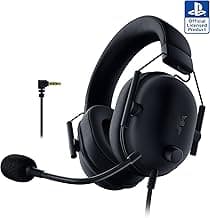
- As an example of a PlayStation‑focused option, consider the Razer BlackShark V2 X (PlayStation), which is marketed for PS5 and offers a simple 3.5mm connection if you want controller plug‑and‑play.
Audio performance and spatial sound
Driver size, tuning, and support for virtual surround or spatial audio make the biggest difference for immersion and competitive awareness. Look beyond marketing terms: check whether a headset offers clear mids for voice, tight bass for explosions, and precise imaging for footsteps.
- Closed‑back earcups usually isolate game noise and help with bass; open or semi‑open designs trade isolation for a more natural soundstage.
- If you want positional accuracy for multiplayer shooters, pick headsets that advertise virtual 7.1 or spatial audio processing and test them with PS5’s Tempest 3D Audio when possible.
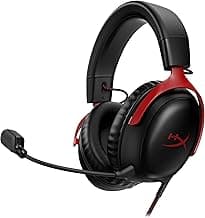
- For a premium, wide‑stage tuning, the HyperX Cloud III is an example that highlights spatial features and larger drivers for richer game sound.
- If you prefer in-ear alternatives for portability, check best gaming earbuds.
Microphone and voice chat clarity
A clear mic matters as much as good game audio if you play online. Prioritize directional or noise‑rejecting mics, and check if the mic is detachable or has a flip‑to‑mute function for convenience.
- Cardioid or omnidirectional mics have different uses—cardioid reduces background noise from behind the mic, while omnidirectional picks up more room ambiance.
- Detachable mics are useful if you’ll also use the headset for music or commuting.
- Look for headsets with companion apps or onboard EQ presets if you want to tweak vocal presence and reduce sibilance for clearer chat.
Comfort, fit, and build quality
Comfort determines how long you can game. Consider clamping force, earcup shape, padding materials, and overall weight. Durable construction matters if you travel or use the headset daily.
- Memory foam or soft protein leather can reduce pressure on ears; breathable fabric is better for long, sweaty sessions.
- Lightweight frames and a well‑distributed headband minimize hot spots—try reviews that report multi‑hour comfort rather than just spec sheets.
- Check how easy it is to replace ear pads or cables; user‑replaceable parts extend the usable life of a headset.
Battery life, latency, and extra features
For wireless headsets, battery life and latency are critical. A long battery is convenient, but low latency is essential for competitive play. Also consider features like EQ presets, RGB, software support, and platform‑specific extras.
- Balance advertised battery hours with real‑world usage—LED lighting and voice processing can shorten playback time.
- If you play fast‑paced games, prioritize headsets with a dedicated low‑latency wireless dongle or a wired option for tournament use.
- Extras such as onboard EQ, companion apps, and durable carrying cases are useful but secondary to fit, audio quality, and microphone clarity. If you're on a tight budget but need wireless, our best budget wireless gaming headsets guide highlights models that balance latency and price.
FAQ
What is the best gaming headset for PS5 overall?
The Razer BlackShark V2 X consistently ranks as an all-around pick for PS5 thanks to clear drivers, a focused cardioid mic and a lightweight, noise-isolating design that suits long sessions. It connects with the PS5 via a 3.5 mm jack, so setup is simple for controller audio. If you want a balanced mix of comfort, mic clarity and competitive sound without extra dongles, it’s a strong choice. Check the model that’s marketed specifically for PlayStation for the best compatibility.
Are wireless headsets worth it for PS5 gaming?
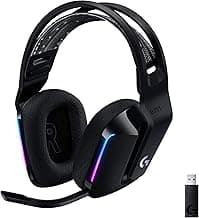
Wireless headsets are worth it if you value freedom of movement and a cleaner setup, but expect to manage battery life and sometimes pay a premium for low-latency performance. The Logitech G733 is a popular wireless option offering decent range, RGB and comfort for casual and competitive play. For cheaper picks, see best budget gaming headsets. For tournament-style play where absolute latency matters, wired is still preferred. Think about whether you’ll use the headset for TV and mobile too—wireless shines in multiplatform use.
Will PS5 Tempest 3D audio work with third-party headsets?
Yes—Tempest 3D Audio works with many third-party headsets, especially wired stereo headsets connected through the controller or certain USB audio devices that the PS5 recognizes. Some headsets are explicitly marketed with Tempest compatibility, like models that list Tempest 3D Audio support in their features. If immersive 3D positioning is important, look for headsets that advertise Tempest or official PlayStation compatibility to reduce guesswork. Also test the headset with the PS5’s built-in 3D audio demo to confirm the experience before relying on it for competitive play.
Which headset is best for long sessions and comfort on PS5?
For long play sessions you want light clamping force, breathable ear cushions and a durable headband—memory foam cups and a flexible frame help a lot. The HyperX Cloud III is known for comfortable memory-foam cushions and a sturdy build that still feels gentle after hours. Also look for adjustable suspension headbands or replaceable ear pads so you can tune fit and airflow over time. If heat buildup is a concern, choose fabric or hybrid pads rather than thick synthetic leather.
How can I improve chat and voice quality on PS5 parties?
Start by positioning the mic correctly and using a headset with noise suppression or a cardioid pattern to reduce background noise. Many headsets offer flip-to-mute or software EQ presets—using those can clean up voice tones and reduce sibilance. If you frequently stream or team up competitively, consider a headset with a higher-quality detachable mic or software voice processing to shape your sound. Finally, test party chat settings on the PS5 and encourage teammates to use push-to-talk or mute when not speaking to cut down on background clutter.
Final Verdict
After comparing the field, the strongest PS5 headsets stood apart through precise audio staging, low-latency connection, and clear, directional microphones paired with long-session comfort. Prioritize driver tuning and positional clarity, mic fidelity for team chat, wired vs wireless latency, and padding/materials for extended play. The best-performing headsets combined accurate spatial cues, dependable connectivity on the PS5, and lightweight, comfortable designs that sustain immersion without causing fatigue.
🏆 Best Overall: Razer BlackShark V2 X PlayStation Headset — 50mm Drivers, Cardioid Mic
💰 Best Budget: Logitech G733 Lightspeed Wireless Headset — PRO-G Audio, RGB
⭐ Best Premium: HyperX Cloud III Wired Headset — 53mm Angled Drivers, DTS Spatial