Buying Guide
Platform compatibility and driver support
Before you buy, confirm the controller works with the devices and games you use. Some controllers are plug-and-play on Windows but need extra drivers or third-party mapping software for macOS, Steam Deck, or Android. If you need broad OS support and modern polling behavior, look for controllers explicitly marketed for PC and mobile; see our best pc game controllers for compatible options.
- Check official compatibility: Manufacturers often list supported platforms—pick a model built for your primary device.
- Native vs. mapped input: Native Xbox/PC layouts tend to require less setup than controllers that rely on mapping software.
- Example: the 8BitDo Ultimate 2C is an example of a budget-friendly option designed for Windows and Android with configurable inputs.
Wired vs. wireless: latency, convenience and battery
Decide whether low-latency wired connections or the convenience of wireless is more important. Wired controllers remove battery and pairing concerns and can offer higher polling rates for competitive play; if you prefer a wired setup, see our best wired game controllers guide. Wireless controllers add freedom of movement but introduce battery management and potential interference.
- Latency needs: For competitive shooters or precise inputs, wired or low-latency 2.4 GHz options are preferable.
- Battery life and charging: If you play long sessions, check advertised battery endurance and whether the controller supports pass-through charging or a dock. If you mostly use wireless pads, our best wireless game controllers roundup covers long-lasting models.
- Polling rates: Higher polling rates reduce input lag; some premium models advertise 1000 Hz (or higher) support for responsiveness.
Sticks, triggers and sensor tech
The quality of analog sticks and triggers has a big effect on precision and durability. Modern sensors—Hall effect or TMR designs—reduce stick drift and provide more consistent trigger response over time. Look for controllers that call out anti-drift features or Hall/TMR technology if longevity matters. For model recommendations and comparisons, check our best game controllers guide.
- Hall effect / TMR sticks: These use magnetic sensing to limit mechanical wear and help prevent drift.
- Trigger feel: Analog vs. digital triggers and whether triggers are remappable can affect racing and shooter controls.
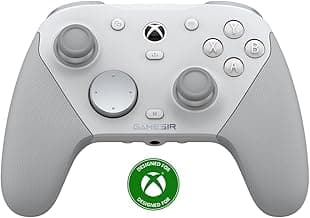
- Example: the GameSir G7 SE advertises Hall effect sticks and triggers for improved longevity and consistency.
Ergonomics, layout and build quality
Comfortable hand feel and a well-placed button layout are essential for long gaming sessions. Pay attention to grip shape, weight, thumbstick height, d-pad type, and button travel. Durable materials and a solid D-pad are especially important for fighting games and platformers.
- Try before you buy: If possible, test a controller to see how it fits your hands and thumb reach.
- Materials and buttons: Look for reinforced shoulder buttons, a precise D-pad, and textured grips for longer sessions.
- Example: the wired Logitech G F310 is often recommended for its familiar console-style layout and sturdy build at a modest price.
Extra features, software and value
Consider which extras matter most: remappable buttons, back paddles, vibration, audio jacks, RGB, or companion apps for custom profiles. Some controllers include docks, fast charging, or onboard memory to save profiles—useful if you switch systems or play different genres.
- Remapping and macros: Built-in remapping or a reliable companion app increases versatility for different games.
- Back paddles and pro features: Additional buttons and adjustable triggers benefit competitive players who want more inputs without moving thumbs.
- Long-term value: Balance feature set against price and brand reputation—sometimes a midrange model with Hall-effect sticks or a docking station is a better long-term buy than a cheaper basic pad.
FAQ
What are the best gamepads for PC right now?
For general PC play you want a comfortable layout, reliable buttons and wide compatibility. The Logitech G F310 is a solid all-around choice that many buyers like for its console-style layout and plug-and-play simplicity. If you need extra features (like hall-effect sticks or extra paddles) look at midrange GameSir or EasySMX models as alternatives. Check reviews and make sure the controller maps cleanly in the games you play before buying.
Wired or wireless — which is better for PC gaming?
Wired controllers usually give the simplest setup and slightly lower latency, which helps in competitive titles, while wireless controllers offer freedom of movement and cleaner desk setup. Battery life and occasional input lag are the main wireless trade-offs, so consider rechargeable options or a wired fallback. If you play on a laptop or Steam Deck frequently, wireless convenience can be worth it. For desktop eSports-style play many prefer wired for consistency.
Which gamepads are best for competitive or pro-level play?
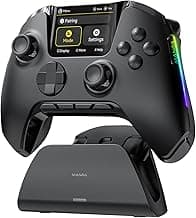
Competitive players typically prioritize precise sticks, low-latency connection and durable buttons, plus remappable inputs for quick actions. The ManbaOne controller is built with pro features like hall-effect sticks and remappable buttons, making it a clear option for serious players. Pair any controller with a wired mode when possible to minimize latency during tournaments. Also test anti-drift performance and trigger responsiveness before committing if you play at a high level.
Are budget controllers good enough for modern games?
Yes—many budget controllers now include hall-effect sticks and decent build quality, so they handle most modern games fine for casual and even competitive play. The 8BitDo Ultimate 2C offers a strong balance of price and features for players on a budget. Expect some compromises in ergonomics, vibration strength, or long-term durability compared with premium models. If you only need reliable input for single-player or casual multiplayer, a budget pick is often perfectly adequate.
How can I tell if a controller will work with Steam Deck or Android?
Look for explicit compatibility in the product description—many controllers list supported platforms like Steam Deck, Android, iOS and Windows. The AceGamer Aurora II, for example, advertises Steam Deck and Android support and can be a good starting point if you need cross-platform use. Also check whether the controller uses Bluetooth, 2.4GHz dongle, or wired USB and whether it needs drivers on your device. Finally read user reports about button mapping and dropouts on the exact hardware you own before buying. For Bluetooth-specific picks, see our best bluetooth game controllers.
Final Verdict
Top gamepads stood out for precise, low-latency inputs, comfortable ergonomics and durable controls; weaker options fell short on stick accuracy, connection responsiveness or useful customization. Buyers should prioritize stick and trigger technology (Hall, TMR or high polling rates), connection type (wired vs wireless latency), comfort for long sessions, and remappable buttons or paddles. The best-performing controllers combined reliable sensors, a solid build and easy customization — those three qualities consistently delivered the smoothest, longest-lasting experience.
🏆 Best Overall: Logitech G F310 Wired Gamepad Controller — Console Layout, D-Pad
💰 Best Budget: 8BitDo Ultimate 2C Wireless Controller — 1000Hz, Hall Joysticks
⭐ Best Premium: GameSir G7 Pro 8K Wireless Controller — 8000Hz, TMR Joysticks