Buying Guide
Platform compatibility
Start by matching the controller to the platforms you play on: PC (best pc game controllers), Switch, PlayStation, Xbox, mobile, or a mix. Some controllers are officially licensed for a single ecosystem and offer plug-and-play support on that platform, while others are designed for cross-platform use and may require a companion app or Steam input for button mapping.
- Look for multi-mode connectivity (Bluetooth, USB, or a wireless dongle) if you switch between PC and mobile. Budget and midrange options from makers like 8BitDo are commonly designed with broad compatibility in mind — useful if you want one pad for several devices. For Bluetooth-specific options, see our best bluetooth game controllers.
- If you need guaranteed compatibility with an Xbox or PlayStation, consider first-party or officially licensed controllers to avoid driver issues or missing features like vibration or profile settings.
Connection type and latency
Decide whether wired or wireless suits your priorities. Wired controllers remove wireless interference and typically offer the lowest latency, which matters for competitive play. Wireless controllers add convenience but vary in polling rates and connectivity modes.
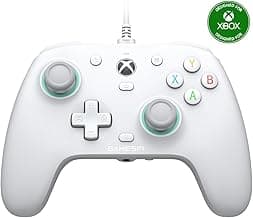
- Wired: ideal for the tightest input response and no battery concerns. For an example of a solid wired option, see the GameSir G7 SE, which focuses on a direct plug-and-play experience. For a broader set of wired picks, check our best wired game controllers.
- Wireless: check the polling rate and whether the controller supports a dedicated USB dongle or low-latency modes. Many modern third‑party controllers advertise 500–1000 Hz polling for smoother input on PC.
Sticks, triggers, and long-term durability
Analog stick and trigger technology heavily influences feel and longevity. Look for controllers that use Hall‑effect or TMR sensors to reduce drift and maintain consistent input over time. Trigger shape and actuation style also affect racing and shooter performance.
- Hall-effect and TMR sensors are more resistant to wear than older potentiometer designs; if drift resistance is a priority, prioritize controllers advertising those technologies.
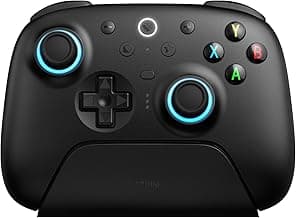
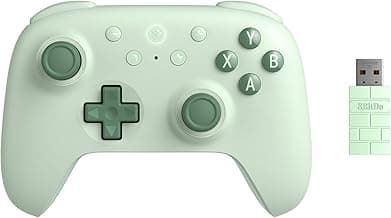
- If you want a specific example of a controller designed around high-end sensor tech and customization, check the 8BitDo Ultimate 2, which highlights modern stick and trigger hardware alongside remapping options.
- Also consider repairability and whether the manufacturer offers replacement parts or an established community for fixes — a controller that’s easier to open and service extends usable life.
Ergonomics, layout, and extra controls
Comfort and control layout matter more than raw specs. Try to match a controller’s shape to your hand size and play style. Look for remappable buttons, extra paddles, and textured grips if you prefer advanced input without finger gymnastics.
- Paddles and remappable triggers are useful for competitive players who want to keep thumbs on the sticks. Compact or travel-focused designs are better if you often play on the go.
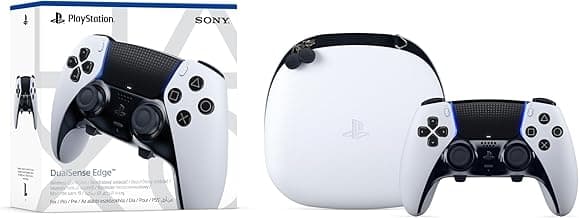
- First‑party Xbox and PlayStation pads typically offer comfortable, well-balanced ergonomics — our best standard controllers roundup highlights those designs — while many third‑party controllers trade features like swappable sticks or programmable buttons for a lower price — weigh which matters more for you.
Battery life, charging, and extras
Consider battery type (removable vs built-in), claimed runtime, and whether a controller includes a charging dock or quick-charge support. Extras like a 3.5mm headset jack, haptic feedback options, or customizable RGB are nice-to-haves but shouldn’t outweigh core performance and compatibility.
- Charging docks and long-lasting battery packs add convenience for heavy wireless users; if you value a simple charging workflow, look for bundles that include docks or magnetic charging solutions.
- Balance extras against price: premium features are appealing, but a controller with solid sensors, low latency, and good ergonomics will improve gameplay more than decorative lighting.
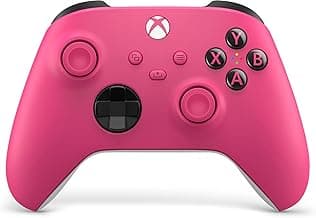
- For players seeking a pro-level feel and reliable build quality, official controllers such as the Xbox Wireless Controller (Pulse Red) are often a safe choice because they combine comfort, durable finishes, and broad platform support.
If long battery life and docked charging are priorities, compare our best wireless game controllers to find models that include docks or large-capacity batteries.
FAQ
Which game controller is best for PC and Xbox right now?
For a solid all-around option that works on both PC and Xbox, many buyers pick a wired pad with reliable sensors and straightforward setup. A wired controller avoids pairing issues and can feel more responsive for many players. If you want a plug-and-play choice with Hall-effect sticks and triggers, consider the GameSir G7 SE as a well-reviewed, budget-friendly option. Wired controllers are also simpler to troubleshoot and usually cheaper than wireless models.
What controller should I buy for competitive FPS play?
Competitive FPS players usually prioritize low input lag, comfortable thumbstick feel, and responsive triggers. Many pros prefer controllers with crisp, tactile triggers and a familiar Xbox-style layout because they’re supported widely on PC and consoles. Official Xbox pads are a common choice for high-level play thanks to consistent build quality and good driver support. Also look for controllers with high-quality thumbsticks (TMR or Hall sensors) and the option to remap buttons if you need edge toggles or paddles.
Are third-party controllers safe to use on consoles?
Yes—third-party controllers can be safe as long as they’re officially licensed or explicitly listed as compatible with your console. Check the product page for licensing information, firmware update support, and return policies before buying. Reading recent user reviews helps spot recurring issues like drift or connectivity problems. If you want extra assurance, choose models that state “officially licensed” or from brands with solid warranty support.
Do wireless controllers add noticeable lag compared to wired ones?
Modern wireless controllers have come a long way and many users won’t notice added lag in casual play, especially on consoles that use low-latency wireless protocols. Some PC-focused wireless models advertise high polling rates (for example, 1000 Hz) to reduce latency closer to wired levels. That said, wired connections still offer the most consistent lowest-latency performance for very competitive players. If latency is critical, use a wired connection or a wireless controller that supports a low-latency mode.
Which controllers offer the best battery life and include a charging dock?
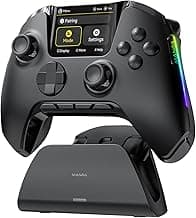
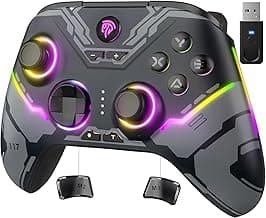
If long battery life and a charging dock are priorities, look for controllers that explicitly list battery capacity and include a dock in the package. The ManbaOne line is one example that advertises an 1800mAh battery and ships with a charging dock, which makes overnight charging convenient. Other premium controllers also include docks or charging stands as part of higher-end bundles, so compare what's included rather than assuming all wireless pads come with docks. A dock can be worth the extra cost if you dislike swapping batteries or dealing with cables every session.
Final Verdict
After testing the shortlist, the winners separated themselves by offering precise sticks and triggers, low-latency connectivity, durable build and thoughtful ergonomics. Buyers should prioritize joystick sensor type (Hall or TMR), polling rate, trigger feel, remappable controls and battery/charging convenience for wireless models. The top controllers all combined accurate input sensors, stable wireless or wired connections and solid button/trigger design—traits that directly improve responsiveness and long sessions without compromise.
🏆 Best Overall: GameSir G7 SE Wired Controller — Hall Effect Joysticks
💰 Best Budget: 8BitDo Ultimate 2 Wireless Controller — TMR Joysticks
⭐ Best Premium: ManbaOne Interactive Screen Wireless Controller — Hall Effect Sticks