Buying Guide
Compatibility and platform support
Before you pick a flight stick, confirm the platforms and OS you’ll use (Windows, Xbox, macOS). Some controllers are plug-and-play for consoles but require drivers or mapping software on PC. If you plan to fly on both PC and Xbox, look for explicit cross-platform support to avoid surprises.
For PC-specific hardware recommendations and driver notes, see our best flight controls for pc.
- Check the product page for supported OS and console models.
- Look for manufacturer software availability for button mapping and calibration.
- Example: the Thrustmaster T-Flight Hotas One is sold as compatible with PC and Xbox Series X|S, which makes it a straightforward choice if you switch between those platforms.
Control layout, ergonomics, and form factor
Decide whether you want a joystick (stick), a yoke, or a full HOTAS (hands on throttle-and-stick; see our best hotas roundup). Joysticks are compact and precise for combat and space sims; yokes are better for general aviation. Ergonomics matter—a comfortable grip, reachable buttons, and a stable base will reduce fatigue during long sessions.
- Try to match the controller form to the games you play (combat vs. airliner sims).
- Consider ambidextrous or left-handed designs if needed.
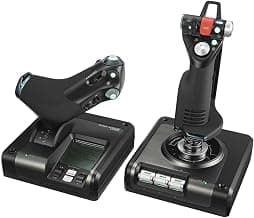
- For a premium yoke-and-throttle layout, consider the Logitech G PRO Flight Yoke, a purpose-built yoke system with a configurable throttle quadrant.
Sensors, precision, and responsiveness
The type of position sensor determines smoothness and longevity. Hall effect sensors and magnetic sensors generally give low friction, drift-free inputs and last longer than potentiometer-based sticks. Also check whether the stick supports adjustable resistance, centering springs, or programmable dead zones so you can tune responsiveness.
- Hall effect controllers tend to offer very fine control—useful if you fly with high sensitivity settings. For a broader comparison that includes sensor types and responsiveness, see our best flight sim controls guide.
- Look for sticks with plenty of axes and programmable buttons if you rely on complex control bindings.
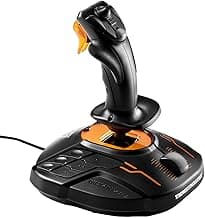
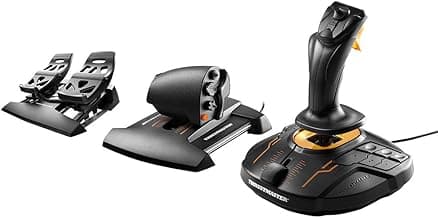
- Example: the Thrustmaster T16000M uses Hall effect technology and an ambidextrous layout, which is helpful if you want precise, long-lasting input without frequent recalibration.
Build quality, components, and durability
Materials and construction affect how a controller feels and how long it lasts. Metal throttles, reinforced shafts, and robust mounting systems resist wear and give a more solid, realistic feel. Consider whether parts are replaceable or serviceable if you plan heavy use. We cover top choices and durability considerations in our best flight controls guide.
- Metal components and sealed sensors are common on higher-end units and improve longevity.
- Check reviews for reports of drift, loose mounts, or plastic wear on moving parts.
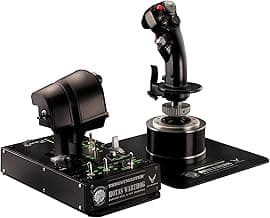
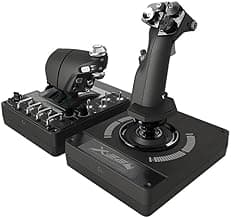
- If you want a heavy-duty, simulator-grade build, the Thrustmaster HOTAS Warthog is a runner-up choice noted for its metal dual-throttle system and replica controls.
Budget, features, and intended use
Set a budget and match features to how you’ll use the stick. Entry-level sticks are fine for casual flying and beginners, while enthusiasts often invest in HOTAS sets or yokes with many programmable controls. Think about extra features you may need: detachable throttles, twist rudder, force feedback (if offered), multiple profiles, and software support.
- For beginners or tight budgets, a simple USB stick with a throttle and a few programmable buttons is often the best value.
- Serious simmers should budget for at least a mid-range HOTAS or a dedicated yoke and throttle quadrant.
- Budget example: the Thrustmaster TCA Sidestick Airbus Edition is positioned as a cost-conscious choice that still offers a realistic sidestick layout and built‑in controls for flight sims.
FAQ
What's the best flight stick for beginners?
For new pilots you want a comfortable, reliable stick with easy setup and plenty of buttons to learn on. The Thrustmaster T16000M is a common beginner pick because it’s ambidextrous, uses precise Hall-effect sensing, and has a straightforward USB setup. It’s not overbuilt or overly expensive, so you can learn without a big upfront investment. If you later want a separate throttle or pedals, the T16000M pairs well with add-ons.
Do I need a separate throttle and rudder pedals?
You don’t strictly need them, but separate throttles and pedals improve realism and control in serious flight sims. Many sticks include a built-in throttle or detachable throttle for basic throttle control, which is fine for casual play and space sims. Rudder pedals give much better yaw control for takeoffs, crosswinds, and coordinated turns, so consider them if you fly regularly. If you’re tight on budget or space, start with a stick that has a throttle and add pedals later.
Which flight stick works best with Xbox consoles?
If you want plug-and-play compatibility with Xbox Series X|S, choose a controller that explicitly supports consoles. The Thrustmaster T-Flight Hotas One is designed for PC and Xbox and offers a detachable throttle and easy console mapping. It gives a good balance of features and ergonomics for console flight sims without complex drivers. For more advanced console users, check compatibility details before buying.
How important are build quality and sensor type in a flight stick?
Build quality and sensors directly affect longevity and precision; higher-end sticks use metal components and Hall-effect sensors to avoid drift and wear. If you plan heavy use or competitive sim flying, spending more on a robust unit pays off—products like the Thrustmaster HOTAS Warthog are built like cockpit hardware. For casual players, plastic sticks with reliable sensors are usually fine and much cheaper. Always read reviews for reports on stick drift and button durability before buying.
Can I use a flight stick for space sims and combat games?
Yes — most flight sticks work well for space sims and dogfighting, but look for lots of buttons and a comfortable grip for complex controls. A versatile stick with many programmable inputs, like the Thrustmaster Sol-R1, makes mapping weapons, thrusters, and camera controls easier. If you play a mix of flight and space titles, prioritize programmable buttons and a detachable or separate throttle. Also check software support for custom profiles so you can switch setups quickly.
Final Verdict
After testing the leading flight sticks, what separated winners from weaker options was clear: sensor precision, throttle fidelity, and ergonomic control layout. Top performers used Hall-effect or magnetic sensors, durable construction, and sensible button mapping; weaker units showed drift or flimsy parts. Buyers should prioritize precise sensors, a responsive throttle/rudder setup, and solid software support. The best-performing chairs shared robust build quality, low input drift, and intuitive layouts that speed up mastery and immersion. For in-depth picks and comparisons, see our best flight simulator controls guide.
🏆 Best Overall: Thrustmaster T-Flight Hotas One — Detachable Throttle Flight Stick
💰 Best Budget: Thrustmaster TCA Sidestick Airbus — Magnetic Sensor Joystick
⭐ Best Premium: Logitech G PRO Flight Yoke System — Professional Yoke & Throttle
![Honeycomb Foxtrot Aviation Stick - flight stick for flight simulation, premium gimbal mechanism, 16bit Hall Effect Sensors, ambidextrous design, compatible with MSFS 2024/2020 for PC & Mac [video game]](/_next/image/?url=https%3A%2F%2Fm.media-amazon.com%2Fimages%2FI%2F610IadVDNUL._AC_UY218_.jpg&w=640&q=75)