Buying Guide
Control type and layout
Choose the control layout that matches the aircraft and flying style you want to simulate. Single-handed sidesticks and HOTAS setups give a compact, immersive cockpit feel for fighters and modern airliners, while yokes and separate throttle quadrants better suit general aviation and airliner replication.
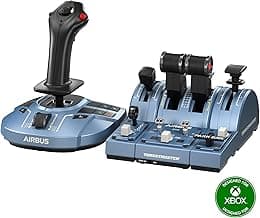
- Sidestick — compact and intuitive for Airbus-style flying; a good example is the Thrustmaster TCA Sidestick, which pairs a realistic grip with an integrated throttle. For other options, see best flight stick.
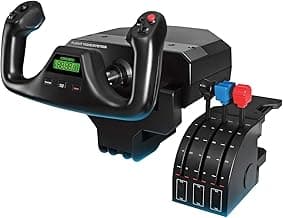
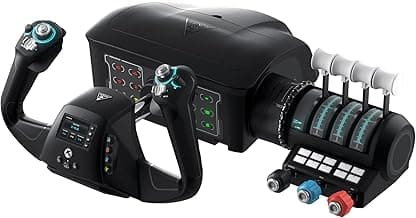
- Yoke + quadrant — better for traditional GA and airliner procedures; consider a full yoke system like the Logitech G PRO Flight Yoke System if you need many dedicated controls.
Sensors, precision, and build quality
The underlying sensing technology (magnetic, Hall-effect, potentiometer) dictates accuracy and longevity. Magnetic and Hall-effect sensors resist wear and maintain precise centering over time. Sturdier materials—metal shafts, reinforced mounts and quality bearings—reduce play and deliver a firmer, more realistic feel.
For a value that emphasizes modern sensors and a robust build, the Thrustmaster Sol-R2 HOSAS uses Hall-effect technology and is designed for long-term accuracy in dual-joystick setups.
Programmability, buttons and software
More programmable axes and buttons let you map radios, flaps, autothrottle, trim and other systems without relying on keyboard shortcuts. Look for devices with onboard memory or vendor software that supports profiles and easy re-mapping.
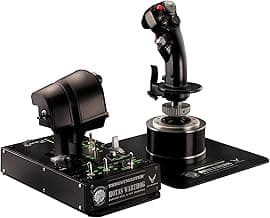
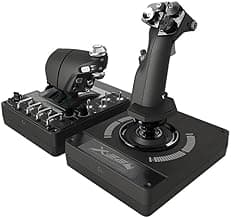
- If you want a controller with very high programmability and multiple mode layers, the Logitech G X56 H.O.T.A.S provides many assignable controls and mode switching for complex cockpits.
- Small LCDs, mode switches and detents on throttles are useful for quickly changing engine and flap settings without pausing the sim.
Compatibility and platform support
Confirm driver and platform support before you buy. Some devices are plug-and-play on PC but need vendor drivers or firmware updates for full functionality. If you want console compatibility, check explicit support for Xbox or PlayStation.
If you primarily use Windows or Xbox, check our best flight controls for pc guide for driver and compatibility notes. For users who need cross-platform support (PC and Xbox), consider an officially supported bundle such as the Thrustmaster TCA Captain Pack X, which is designed with console compatibility in mind.
Budget, expandability and ergonomics
Decide whether to invest in a single cockpit piece or start small and expand. Entry-level throttles and compact sticks let you start cheaply, while modular systems let you add rudder pedals, dedicated throttle quadrants or a separate instrument panel later.
- Budget throttle — If you need an affordable, dedicated throttle quadrant to pair with an existing stick or yoke, the Logitech G Saitek PRO Throttle Quadrant is a lightweight option with useful fader-style levers and an adjustable bracket.
- Ergonomics — Check arm rest height, clamp strength and hand shape. Comfortable grips and correct spacing reduce fatigue during long flights.
If you also use controllers for other PC games or sims, our roundup of best pc game controllers can help you choose versatile hardware that works across titles.
FAQ
What are the best flight simulator controls for beginners?
Look for a simple, plug-and-play package that includes both a stick and throttle so you can learn basic flight controls without extra purchases. The Thrustmaster Captain Pack X is designed for new users with an ergonomic sidestick and throttle replica that makes setup straightforward. Beginners benefit from a comfortable grip, clear button layout, and broad game compatibility so you can focus on learning. Start with modest complexity and add pedals or more advanced gear later as your skills grow. You can also review our best flight sim controls list for beginner-friendly packages.
HOTAS or yoke and throttle: which setup is better for my flying style?
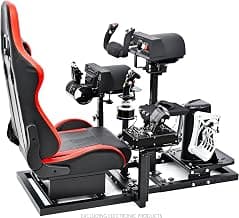
HOTAS setups (joystick plus throttle) are ideal for combat, aerobatic, and space sims because they keep all important controls under your hands for quick responses. Yoke-and-throttle systems better match general aviation and airliner flying, giving a more realistic feel for those aircraft types. Consider the type of planes you enjoy and whether you need lots of programmable buttons or a faithful cockpit feel. It's also common to mix systems—yoke for airliners and a separate HOTAS for fighters—if your budget allows.
Do I need rudder pedals for a realistic flight sim experience?
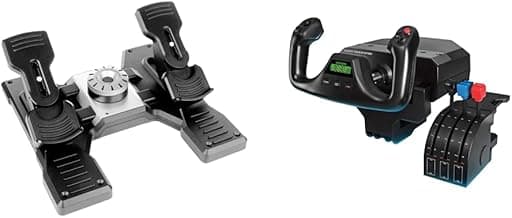
Rudder pedals greatly improve realism for takeoffs, crosswind landings, and coordinated turns, so they’re worth adding once you’re comfortable with basic controls. They also let you control yaw smoothly and perform differential braking when taxiing. If you mainly fly small single-engine planes, pedals make a noticeable difference; in some jet-focused setups players rely more on trim and rudder inputs from the throttle quadrant. You can start without pedals and add them later, but serious sim pilots usually consider them essential.
How much should I expect to spend on quality flight controls?
Entry-level components like a basic throttle quadrant or single joystick often start around $70–$150, which is enough for casual flying and learning fundamentals. Mid-range systems—yokes, more feature-rich HOTAS, and bundled sets—typically fall between $150 and $300 and offer better build quality and more programmable controls. Premium setups with hall-effect sensors, multiple modules, or high-end rudder pedals can run $300 and up for a near-professional experience. For a solid budget example, consider the Logitech Saitek PRO Throttle Quadrant as a compact, affordable starting point.
What features should I prioritize when choosing flight simulator controls?
Prioritize sensor quality (magnetic or hall-effect for accuracy and longevity), solid build materials, and modularity so you can expand later. Look for plenty of programmable buttons and software customization to map controls the way you fly, plus compatibility with your platform and favorite sims. Ergonomics matter—comfortable grips and well-placed switches reduce fatigue during long sessions. As an example of a controller with a magnetic sensor and good overall balance, the Thrustmaster TCA Sidestick is often recommended for its precise input and replica feel.
Final Verdict
After testing the top flight controls the winners stood out for precise sensors, solid build and high programmability; weaker options fell short on sensor fidelity, button count and mounting stability. Prioritize sensor type (magnetic or Hall), reliable clamps or hardware mounting, programmable axes/buttons and a tactile throttle/yoke feel for realistic inputs. The best-performing chairs had robust construction, secure mounting and intuitive layouts—qualities that directly translate into smoother, more consistent flight control. See the full list of best flight controls for detailed scores and comparison.
🏆 Best Overall: Thrustmaster TCA Sidestick Airbus Edition — Magnetic Sensor Sidestick
💰 Best Budget: Logitech G Saitek PRO Throttle Quadrant — LCD Axis Levers
⭐ Best Premium: Logitech G X56 H.O.T.A.S — Programmable Throttle & Joystick
![Honeycomb Alpha LITE - compact yoke for flight simulation, 180 rotation, programmable buttons, sturdy steel shaft, clear design perfect for sim beginners, plug & fly with MSFS 2024 [video game] [video game] [video game]](/_next/image/?url=https%3A%2F%2Fm.media-amazon.com%2Fimages%2FI%2F61arHxXosfL._AC_UL320_.jpg&w=640&q=75)