Buying Guide
Compatibility and platform support
Make sure the controls you choose work with your primary platform—PC, Xbox, PlayStation, or a mix. Some modern units are plug-and-play on multiple systems, while others rely on manufacturer drivers or third‑party wrappers for full functionality. If you plan to fly on both PC and Xbox, consider a cross‑platform system that explicitly lists both. For a focused comparison of PC options, see our best flight controls for pc guide.
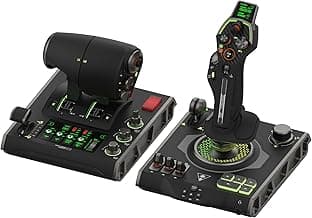
For example, the Turtle Beach VelocityOne Flight is marketed as compatible with Xbox and Windows, which simplifies setup if you switch between console and PC sims.
Control type and cockpit layout
Decide which control configuration matches the aircraft and flying style you want to simulate. Common options:
- HOTAS (stick + throttle): great for fighters and general single‑stick flight.
- Yoke + throttle quadrant: better for GA and airliner-style flying.
- Rudder pedals: essential for realistic rudder and toe‑brake control, especially in multi‑engine and airliner sims.
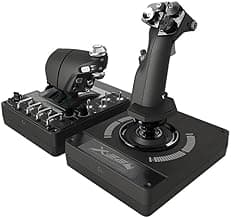
If you prefer a compact, all‑in‑one stick and throttle, a HOTAS like the Thrustmaster T-Flight Hotas X is a common choice for hobbyists who want a simple, space‑efficient setup. If you're shopping for sticks specifically, our best flight stick roundup highlights top HOTAS and standalone sticks at each price point.
Precision, sensors and input technology
Look at what sensors and input mechanisms the device uses—magnetic (Hall effect) or optical sensors generally outlast potentiometers and provide smoother, drift‑free input. Also check whether the unit offers adjustable resistance, detents, or centering characteristics; these affect how realistic and responsive the controls feel.
Pay attention to resolution and deadzone settings in the device software. Good firmware and calibration options let you tune sensitivity for different aircraft and flight phases, which improves accuracy without needing to constantly recalibrate hardware. For a broader look at sensor types and controller tech across the market, see our best flight controls review.
Build quality, ergonomics and adjustability
Sturdy materials, a solid mounting solution, and comfortable grips matter if you plan long flights. Metal shafts, reinforced bases, and adjustable tension or throw let you tailor the feel from light sport planes to heavier airliners.
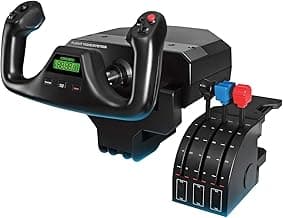
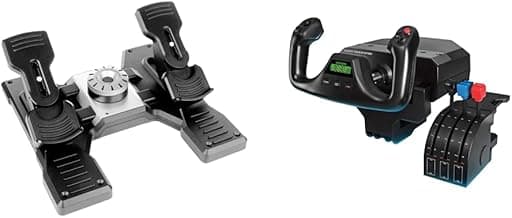
Budget yokes can still be well made; for an entry-friendly yoke that balances price and features, the Logitech G PRO Flight Yoke is often recommended for users who want a reliable, ergonomically designed wheel without stepping up to a full professional cockpit.
Software, programmability and community support
Check what configuration software the manufacturer provides and whether it supports profiles, macro programming and easy button mapping. Strong software support makes it faster to tailor controls to complex aircraft or to share profiles with the community.
Also research community resources—forums, preset libraries and third‑party plugins—especially for niche hardware. Popular devices often have established user guides and downloadable profiles that reduce setup time and expand functionality.
Budget, expandability and upgrade path
Decide whether you want a simple starter setup or a modular system you can expand over time. Many simmers begin with a single joystick or HOTAS and later add pedals or a throttle quadrant. Buying a platform with modular accessories can save money in the long run.
- Starter approach: buy one versatile control (stick or yoke) and add pedals later.
- Modular approach: choose a brand ecosystem so add‑ons (throttle quadrants, panels, pedals) integrate smoothly.
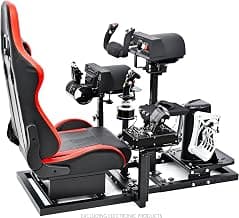
- Professional/upgrades: consider bundles or higher‑end devices if you want a turnkey cockpit experience from the start.
Balancing your immediate needs with a clear upgrade path helps you get into flying faster while protecting your investment as skills and expectations grow. If you also use general-purpose input devices alongside dedicated sim gear, our best pc game controllers list can help you pick multi-use controllers that perform well on both sims and other PC games.
FAQ
What flight sim controls do I need to start as a beginner?
Start with a joystick and throttle to get the core flying experience; rudder pedals are a valuable upgrade but not strictly required at first. Look for a plug-and-play bundle with decent ergonomics and reliable sensors so you can focus on learning the sim. A purpose-built starter pack can save you setup headaches and give a realistic feel without a huge cost. For an easy entry point, consider the Thrustmaster T16000M Flight Pack, which is marketed as beginner-friendly and compatible with PC.
Should I buy a yoke or a HOTAS for flight simulators?
Choose based on the aircraft you want to fly: yokes and throttle quadrants better mimic general aviation and airliners, while HOTAS (joystick + throttle) suits military jets and smaller aircraft. Yokes give more realistic pitch/roll input for prop and airliner operations, whereas HOTAS setups are more compact and great for dogfighting or space sims. Space, desk layout, and the types of modules you fly regularly should guide your decision. If you fly a mix, you can start with a HOTAS and add a yoke later when budget and space allow.
Do rudder pedals really improve realism and control?
Yes—rudder pedals add precise yaw control, make takeoffs and crosswind landings much smoother, and are essential for realistic twin-engine and heavy-aircraft handling. They also let you free up your hands for throttle and trim adjustments, improving immersion and procedure accuracy. Quality pedals have adjustable tension and travel to match your preference and can transform your simming experience. A popular choice for many enthusiasts is the Logitech G Pro Flight Rudder Pedals, which are frequently recommended for their build and feel.
How much should I budget for a complete flight sim control setup?
Expect a basic joystick and throttle to cost roughly $50–$200, mid-range yoke or rudder pedals around $150–$400, and premium full cockpits or modular setups from $400 upward. Bundles can save money versus buying every component separately, but modular gear gives better upgrade paths as your skills grow. Decide which aircraft and level of realism you want first, then allocate budget to the most impactful pieces like a good stick and pedals. For a high-end example that combines multiple controls, see the Turtle Beach VelocityOne Flight system, which targets users who want a premium, all-in-one experience.
Can flight sim controls work on both PC and consoles?
Compatibility varies by model: many controllers are PC-only, while some manufacturers offer console-compatible versions or cross-platform support. Check product descriptions for explicit Xbox/PlayStation compatibility and whether the vendor provides console drivers or firmware updates. Also confirm whether the sim software you use supports that hardware on your platform. If you need cross-platform use, prioritize controllers advertised as multi-platform and read recent user reviews to ensure plug-and-play operation.
Final Verdict
After comparing the leading flight-sim controls, the top picks separated themselves through accurate, low-drift sensors, solid build quality, and ergonomics that keep inputs intuitive under load; weaker options fell short on precision or long-term durability. Buyers should prioritize sensor type and resolution, mounting/stability, programmable controls, and adjustable resistance or trim. The best-performing units consistently paired reliable, repeatable input with sturdy construction and a layout that reduces fatigue during extended flights. For a side-by-side comparison and full specs, check our best flight simulator controls guide.
🏆 Best Overall: Thrustmaster T-Flight Hotas X
💰 Best Budget: Logitech G PRO Flight Yoke System
⭐ Best Premium: Turtle Beach VelocityOne Flight Control System
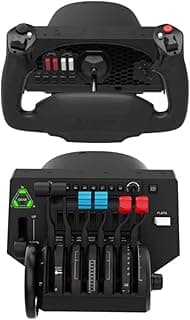
![Honeycomb Alpha LITE - compact yoke for flight simulation, 180 rotation, programmable buttons, sturdy steel shaft, clear design perfect for sim beginners, plug & fly with MSFS 2024 [video game] [video game] [video game]](/_next/image/?url=https%3A%2F%2Fm.media-amazon.com%2Fimages%2FI%2F61arHxXosfL._AC_UL320_.jpg&w=640&q=75)