Buying Guide
Control configuration: HOTAS, yoke, or pedals?
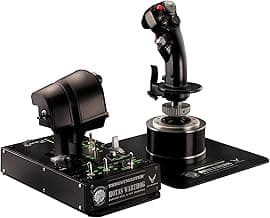
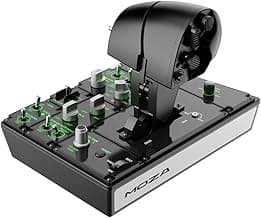
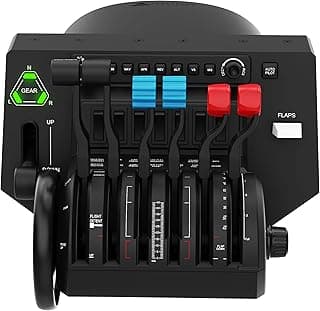
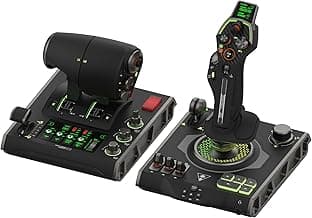
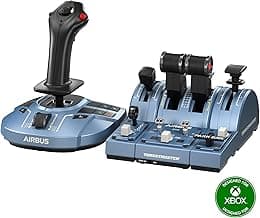
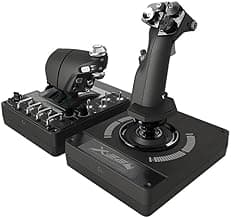
Choose a control layout that matches the aircraft and flying style you intend to simulate. HOTAS (hands on throttle-and-stick) setups are versatile for fighters and general flight sims, while a yoke and separate throttle quadrant feel more like light- and commercial-aircraft cockpits. Rudder pedals are essential for realistic taxiing, coordinated turns, and accurate rudder input. If you want platform-specific recommendations, see best flight controls for pc.
For a compact, general-purpose HOTAS that works well for most users, the Thrustmaster T-Flight Hotas X is a common choice thanks to its detachable throttle and programmable buttons.
Compatibility and platform support
Before buying, confirm platform and driver support. Some controllers are plug-and-play on PC but require specific drivers for advanced features. For broader controller comparisons, see best pc game controllers. If you plan to fly on console (Xbox or PlayStation), verify official compatibility—some yokes and pedals are PC-only, while others support multiple consoles.
- Check the product page for Windows, macOS, Xbox, or PlayStation compatibility.
- Look for USB connectivity and whether the manufacturer provides mapping software or firmware updates.
- If you use a flight sim like Microsoft Flight Simulator, ensure community and developer support for your chosen controller type.
Build quality, precision, and adjustability
Precision matters: look for smooth axes, minimal dead zones, and options to adjust resistance or travel. Metal parts, sealed potentiometers or Hall-effect sensors, and robust mounting means longer life and more faithful control feel. Sliding rails or adjustable toe/heel stops on pedals improve fine control.
If you want pedals with a smooth rail system and solid construction, consider a dedicated set such as the Thrustmaster TFRP rudder pedals, which highlight sliding rails for precision.
Programmability, ergonomics, and workflow
Number and placement of buttons, hat switches, and programmable axes determine how comfortably you can manage avionics, flaps, trim, and camera controls without reaching for the keyboard. Look for detachable throttles, multiple profiles or modes, and intuitive knob layouts if you fly complex aircraft. For stick-focused options and ergonomic comparisons, see best flight stick.
- Prioritize a layout where essential controls are reachable without breaking your grip.
- Confirm the vendor’s software supports button mapping and profile saving.
- Consider a throttle quadrant with multiple levers if you expect to fly multi-engine aircraft.
Size, mounting, and workspace considerations
Measure your desk and seating position. Full yoke systems and wide pedal sets need more floor and desk space, while compact HOTAS setups are better for small desks or couch gaming. Mounting options (clamps, bolt-through bases, or dedicated mounts) affect stability—cheap clamps can slip under heavy use.
If you need a solid, space-efficient mounting solution, a dedicated desk mount such as the Hikig desk mount can secure joysticks and throttles without drilling into furniture.
FAQ
What are the best flight controls for beginners?
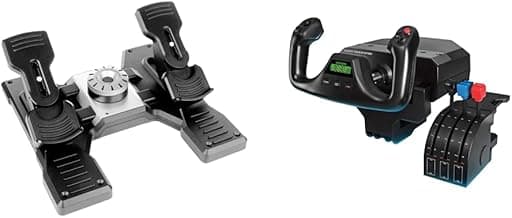
For new sim pilots look for a controller that’s easy to set up, durable, and not overloaded with buttons. A dedicated yoke system gives a natural feel for GA-style flying and simplifies learning basic flight procedures. If you want a ready-made beginner kit, the Logitech G PRO Flight Yoke is marketed toward entry-level users and includes a throttle quadrant to get you started. Start with that and add pedals or a more advanced HOTAS later as your skills grow.
Do I need rudder pedals for realistic flight simulation?
Rudder pedals are important for full realism because they handle yaw control during taxi, crosswind takeoff and coordinated turns. Casual players can get by with keyboard or twist-handle inputs, but pedals noticeably improve precision for takeoff, landing and aerobatics. A budget-friendly option to consider is the Logitech G Pro Flight Rudder Pedals, which are a common upgrade for users moving beyond basic controls. If you fly regularly or want to learn proper rudder technique, pedals are worth the investment.
Are HOTAS systems worth buying for casual simmers?
HOTAS rigs put throttle and stick controls at your hands, which is very immersive for combat flight and many civilian aircraft roles. For casual simmers who play infrequently, a basic joystick may be enough, but HOTAS adds convenience for frequent flying and more natural throttle management. A solid affordable choice is the Thrustmaster T-Flight HOTAS X, which balances features and price for users who want an upgrade without committing to a pro setup. Consider how much time you’ll spend flying and what aircraft types you prefer before choosing HOTAS over a simpler stick.
Should I buy a desk mount or clamp for my flight controls?
A desk mount or clamp improves stability, prevents sliding during aggressive inputs, and lets you position controls ergonomically without sacrificing desk space. If you use heavier HOTAS units or a yoke and want a permanent, secure setup, a dedicated mount is recommended. The Hikig desk mount is a popular choice for users who need professional-grade mounting and compatibility with many controllers. For occasional flyers, non-clamp solutions or anti-slip mats may suffice, but mounts are worthwhile for frequent use.
Which flight controls work best on a small desk or in a compact space?
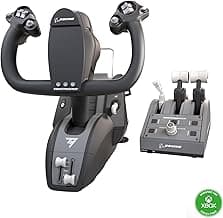
If space is limited, choose compact HOTAS units or modular systems that let you detach the throttle when not in use. Compact yokes tend to take up more lateral space, so a smaller joystick-plus-throttle or a compact all-in-one system usually fits better. The Turtle Beach VelocityOne Compact is designed for tighter setups and offers trim and rudder controls without a large footprint. Also consider a clamp mount to tuck your controls closer to the desk edge when not flying. If you want compact options among top-rated gear, see best flight simulator controls.
Final Verdict
After testing the top flight controls the winners stood out through precise, repeatable input and thoughtfully mapped controls—solid sensors, a stable base or mounting, and a configurable throttle/yoke layout separated best from weaker options. Buyers should prioritize axis smoothness, build quality, programmable buttons, and platform compatibility. The top-performing units shared tight tolerances, ergonomic layouts, and reliable detents or resistance adjustments that make extended sessions comfortable and consistently accurate. For a broader comparison of options tested, see best flight sim controls.
🏆 Best Overall: Thrustmaster T-Flight Hotas X Throttle & Joystick
💰 Best Budget: Logitech G Pro Flight Rudder Pedals
⭐ Best Premium: Thrustmaster TFRP Flight Rudder Pedals