Buying Guide
Pick the right control type for your sim style
Flight controls come in several forms—joysticks (single-stick), HOTAS (hands on throttle and stick), yokes, and rudder pedals—and the best choice depends on the kind of flying you do. Airliner and general aviation fans usually prefer yokes and throttle quadrants for realistic control; combat and space sim players often favor HOTAS or sticks for responsiveness and weapon controls; and almost every serious setup benefits from dedicated rudder pedals.
For model recommendations and comparisons, see our best flight controls.
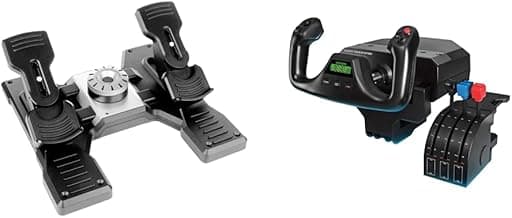
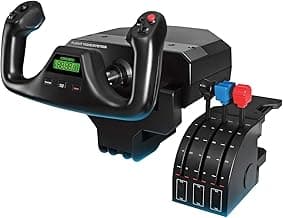
- For a full yoke-and-throttle experience, consider a purpose-built yoke system like the Logitech G PRO Flight Yoke System.
- If you fly fighters or want a compact, responsive setup pick a HOTAS or joystick and add pedals later.
Sensors, precision, and input technology
Sensor type (Hall effect vs potentiometer) and resolution determine how smooth and accurate stick, throttle, and rudder inputs feel. Hall-effect and magnetic sensors offer near-frictionless movement and long-term consistency; traditional potentiometers can be fine on budget gear but wear out faster. Also look for features like ambidextrous grips, detents on throttle levers, and programmable axis curves for fine tuning.
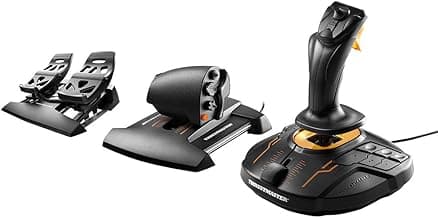
Magnetic or Hall sensors are best for precise control and longevity—an example is the Thrustmaster T16000M, which uses Hall-effect sensing. If you’re choosing a stick specifically, check our best flight stick guide.
- Magnetic or Hall sensors are best for precise control and longevity—an example is the Thrustmaster T16000M, which uses Hall-effect sensing.
- Check whether the device supports custom dead zones, sensitivity curves, and calibration tools in software.
Ergonomics, button layout, and programmability
Ergonomics affect comfort during long flights; look for a comfortable grip, logical button placement, and a detachable or adjustable throttle if you switch aircraft types. Programmability is equally important—assignable buttons, hat switches, and onboard profiles let you map controls per aircraft and store those profiles on the device or in companion software.
For a wider look at layouts and programmable options see our best flight simulator controls.
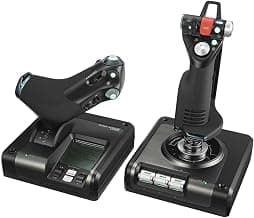
- Detachable throttles and intuitive button clusters help when you switch between small GA and multi-engine or combat aircraft—models like the Thrustmaster T-Flight Hotas X illustrate a user-friendly HOTAS layout.
- Look for dedicated trim wheels, multi-position hats, and easy profile switching if you use multiple sims.
Build quality and premium features
Materials and construction affect feel and long-term durability. Metal shafts, reinforced mounting points, and higher-quality switches are common on premium gear and deliver a firmer, more realistic control feel. If you want the most authentic military or high-end civilian controls, premium replicas and dual-metal throttles are worth the investment.
For premium and replica-feel comparisons, visit our best flight sim controls.
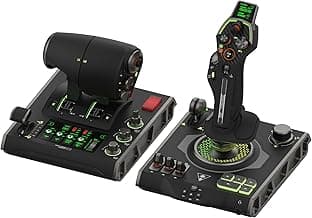
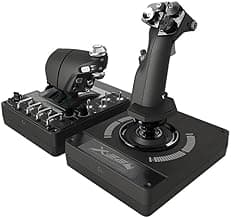
- If steel construction and a replica feel matter to you, premium controllers such as the Thrustmaster HOTAS Warthog are built for durability and realism.
- Consider warranty and community support—longer warranties and strong aftermarket communities make repairs and mods easier.
Compatibility, software support, and expandability
Make sure the controls work cleanly with your OS and flight sims. Native USB class-compliant support makes setup straightforward on Windows; but many devices benefit from vendor drivers and configuration software for button mapping and profile management. Also plan for expandability—adding rudder pedals, throttle quadrants, or a trim wheel later should be straightforward if you choose a widely supported brand.
If you use controllers across genres and want to compare compatibility, see our best pc game controllers roundup.
- Check platform compatibility (Windows versions, Steam, Microsoft Flight Simulator) and whether the manufacturer provides frequent driver updates.
- Think about future additions: a basic stick today can become a full rig with separate rudder pedals and a throttle quadrant tomorrow.
FAQ
What are the best flight controls for PC for beginners?
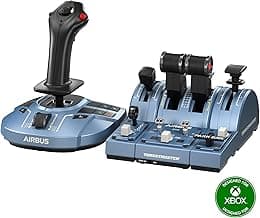
For new sim pilots look for a simple HOTAS or a compact sidestick with easy setup and reliable sensors. A good beginner choice is the Thrustmaster TCA Sidestick Airbus for its comfortable layout and built-in throttle that keeps controls intuitive. If you prefer a traditional stick plus separate throttle, lightweight HOTAS units like the Thrustmaster Hotas X are affordable and easy to install. Start with a basic setup and add pedals or a better throttle later as your skills grow.
Do I need rudder pedals for PC flight simulators?
Rudder pedals aren’t required for every sim session, but they significantly improve realism and control in aircraft that rely on yaw inputs, like airliners, taildraggers, and helicopters. Pedals help with coordinated turns, crosswind takeoffs and landings, and more precise taxiing. If you fly mainly casual VFR or arcade-style games, keyboard or controller rudder can be acceptable at first. For progression into accurate flying or multiplayer realism, a dedicated pedal set is worth the investment.
Which flight controls are best for combat flight sims on PC?
Combat sims benefit from a full HOTAS setup with a robust stick and dual throttle capability to manage weapons, thrust and quick toggles. The Thrustmaster HOTAS Warthog is widely regarded for its heavy-duty construction, precise inputs and military-style layout that suit fast-paced aerial combat. Pairing that with a programmable throttle quadrant and good button placement makes weapon and camera management much easier. Prioritize durability and high-resolution sensors if you plan on long multiplayer or tournament play.
What’s the best value flight stick for PC under $100?
If you want quality without spending much, the Thrustmaster T16000M offers excellent precision thanks to Hall-effect sensors and an ambidextrous design at a wallet-friendly price. It provides programmable buttons and good stick travel, making it versatile for both civilian and combat sims. Installation is typically plug-and-play on Windows and it’s easy to map controls in popular simulators. For under $100 it strikes a strong balance between performance and cost.
Should I buy a yoke or joystick for flight simulation on PC?
Choose a yoke if you mainly fly GA aircraft and airliners—yokes give the control feel and ergonomics used in those planes—whereas joysticks and HOTAS are better for fighters and helicopters. A professional option for keyboard-free GA sims is the Logitech G PRO Flight Yoke System, which includes a throttle quadrant and many programmable controls for a full cockpit feel. If you switch between aircraft types frequently, consider modular setups or a detachable throttle so you can adapt to both flying styles. Think about desk space, the aircraft you fly most, and how immersive you want the experience to be before buying.
Final Verdict
After testing the range of flight controls, the strongest products stood out for precise input, durable construction, and thoughtful control layouts—features that deliver consistent, predictable behavior in any simulator. Buyers should prioritize sensor precision (Hall‑effect or magnetic options), a detachable or dual throttle for realistic power management, plentiful programmable buttons, and sturdy build quality. The best-performing chairs had predictable ergonomics, rock‑solid hardware, and easy access to configurable controls.
If you also use controllers for other PC games, check our best game controllers for broader recommendations.
🏆 Best Overall: Thrustmaster T-Flight Hotas X flight throttle & joystick
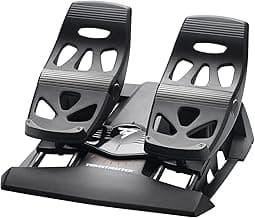
💰 Best Budget: Logitech G Pro Flight Rudder Pedals
⭐ Best Premium: Thrustmaster HOTAS Warthog flight stick & dual throttle