Buying Guide
Switch type and key feel
osu!mania depends on consistent, repeatable key presses. The switch technology (mechanical, optical, Hall, TMR, magnetic linear) determines actuation smoothness, debounce behavior and long-term consistency. Look for switches with short, crisp travel and low wobble to reduce mispresses during fast streams. If you're also comparing devices that target rhythm titles specifically, see best music game controller for related options and form factors.
- Prefer Hall or optical-style switches if you want near-zero drift and long durability.
- Linear switches are typically better for rhythm timing than tactile switches because they avoid unexpected bumps during rapid repeats.
- If you want a hybrid experience with extra controls (knob, screen, hotkeys), some mini keypads come with advanced switch configurations—consider those if you use macros or overlays; for example, the BTXETUEL SayoDevice O3C uses hall and magnetic linear switch tech and includes extras like a knob and screen.
Layout, number of keys and programmability
Decide whether you want a dedicated multi-key keypad (2–4 keys), a compact controller, or a full gamepad (see best gamepads). osu!mania players often prefer small, ergonomic keypads that minimize finger travel and allow custom mapping for alternate keysets.
- Smaller keypads (2–4 keys) reduce hand movement and are easier to position for comfort and speed.
- Programmability: onboard remapping, macros, and hardware profiles let you switch layouts quickly without extra software—essential for players who use different keymaps.
- For pro-level customization, consider purpose-built mini keypads; the 3 Key Mini Keypad is an example aimed at advanced users who need precise programming and RGB feedback.
Latency, polling rate and connectivity
Low latency is crucial for rhythm accuracy. Wired connections typically offer the lowest and most consistent latency (see best pc game controllers), but some modern wireless controllers with high polling rates are fine if you need mobility.
- Look for devices advertising high polling rates (500–1000 Hz or higher) for minimal input lag.
- Wired USB is the safest choice for competitive accuracy; multi-mode devices that offer both wired and high-rate wireless are convenient.
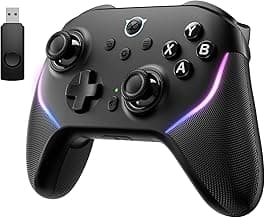
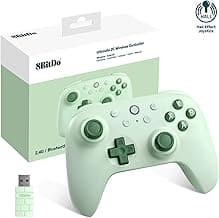
- If you prefer a full controller form factor with strong polling performance, the 8BitDo Ultimate 2C illustrates a controller with high polling specs suitable for low-latency play.
Ergonomics, size and build quality
Comfort and stability affect long practice sessions. Consider height, key spacing, case material and whether the device can be positioned on a desk or mounted for your preferred hand posture.
- Compact footprints reduce reach; look for rubber feet or removable stands to prevent slipping during fast play.
- Metal plates or reinforced PCBs improve longevity and reduce key wobble.
- Try to test hand placement where possible—small differences in key spacing can affect accuracy more than raw switch specs.
Software support and platform compatibility
Reliable firmware and easy remapping tools make it simple to set up osu! keybinds and save profiles. Check that the device supports your OS (Windows is the primary platform for osu!), and whether it stores mappings onboard or requires constant driver software.
- Onboard profile storage is ideal for switching between PCs or setups without reinstalling software.
- Open, well-documented utilities let you fine-tune debounce, macros and LED feedback; avoid devices with buggy or unsupported software.
- Confirm basic compatibility (HID keyboards for keypads; gamepad/keyboard modes for controllers) so osu! sees inputs reliably without complex workarounds. See also best usb music controllers for devices focused on reliable USB connectivity.
FAQ
What is the best controller for osu!mania players?
For osu!mania most players prefer a compact mechanical keypad over a full gamepad because keypads put all the timing keys within easy reach and reduce hand movement. If you want a ready-made option that focuses on osu!mania workflows, a small programmable mini keypad is a strong choice since it’s designed for rapid, repeatable inputs. Look for solid switches, programmable macros, and a layout that matches the key count you play most. A good example to consider is the 3 Key Mini Keypad, which is built specifically for compact rhythm use and office/OSU workflows.
Can I use a regular gamepad for osu!mania or is a keypad better?
You can use a regular gamepad, but keypads usually give faster, more consistent keystrokes for rhythm timing because they place all necessary keys under one hand. Gamepads like the 8BitDo Ultimate 2C or GameSir controllers work fine for casual play and are more versatile for other games. If you want the best timing precision and least fatigue in long sessions, dedicated keypads tend to be the better tool. For versatility between osu!mania and other genres, a gamepad is a practical compromise.
How many keys should an osu!mania keypad have for competitive play?
Match the keypad’s key count to the mode you mainly play: choose a 4-key layout for 4K maps, larger keyboards for 7K, and small 3–4 key pads for side bindings or hybrid setups. Many competitive players use a compact keypad as a secondary device to offload some columns while keeping a full keyboard for others. If you need a dedicated small controller for 4-key play, a 4-key mini keypad can simplify timing and reduce travel between columns. A reliable budget option in that form factor is the aikeec 4-Key Keypad.
Do wireless keypads introduce input lag in osu!mania?
Wireless keypads can introduce a small amount of latency compared with a wired USB connection, but modern 2.4 GHz adapters and high-polling-rate devices have become very responsive. Controllers and pads that advertise high polling rates or use a dedicated dongle (rather than Bluetooth) tend to feel closest to wired input; several controllers list 1000 Hz polling for low latency. If absolute timing accuracy matters—such as top competitive play—use a wired connection when possible to minimize any variability. For casual play, a well-built wireless keypad or controller usually performs well enough.
What's the best budget keypad for osu!mania beginners?
Beginners should look for a compact keypad with programmable keys and reliable switches without spending much, and many budget mini keypads deliver that balance. The SayoDevice O3C is positioned as a budget-friendly mini keypad with features like programmable macros and hot-swap support, making it easy to tailor to your keybinds. That combination lets you learn layouts and timing without committing to a high-end device. If you want a low-cost starting point, consider the SayoDevice O3C for a practical beginner option.
Final Verdict
Precision, low-latency inputs and reliable Hall-effect sensors separated the best controllers from weaker options. For osu!mania players prioritize drift-free Hall joysticks or fast mechanical triggers, high polling rates, remappable buttons, and comfortable ergonomics for long practice sessions. The top performers all delivered consistent, repeatable inputs and solid build quality — the combination that directly improves timing and accuracy. For controllers optimized toward other rhythm games, you may also want to compare choices in best controller for beatmania.
🏆 Best Overall: 8BitDo Ultimate 2C — Wireless Controller, Hall Effect Joysticks
💰 Best Budget: BTXETUEL SayoDevice O3C — OSU Mini Keypad, Rapid Hall Triggers
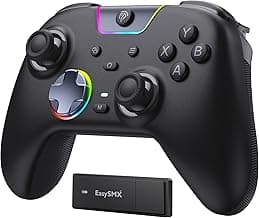
⭐ Best Premium: EasySMX X05Pro — Wireless Controller, Hall Joysticks