Buying Guide
Compatibility & platform support
Before you buy, confirm the controller explicitly lists the platforms you use. "Bluetooth" can mean different things on different devices — some controllers pair natively with Android, iOS, Windows, Steam Deck or Nintendo Switch, while others rely on a 2.4 GHz dongle or a wired USB-C connection for full feature support. If you plan to move between a console and a PC, prioritize controllers that advertise multi-device pairing and broad OS compatibility. For recommendations focused on wireless options across platforms, see our best wireless game controllers.
- Check whether button mapping, gyro, and vibration work on each platform — manufacturers often note platform limitations in the product description.
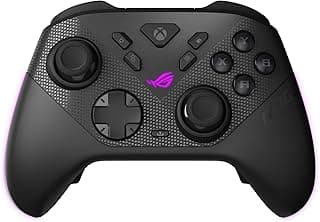
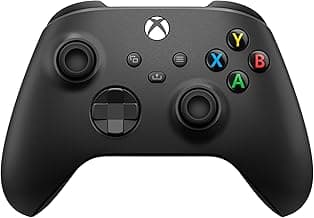
- For a solid all-around example that supports Bluetooth and USB-C, consider the Xbox Wireless Controller, which lists console, PC and Bluetooth support in its specs.
Connectivity, latency and polling rate
Latency matters most for fast-paced games. Bluetooth variants differ by version and implementation — newer controllers and hosts with BLE (Bluetooth Low Energy) tend to pair more reliably and use less battery, but polling rate and driver support also affect responsiveness.
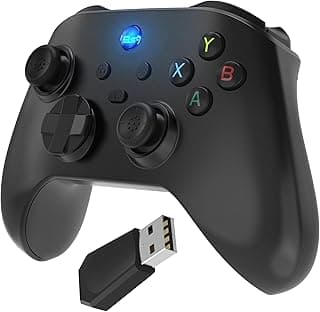
- For the lowest input lag, look for controllers that offer a wired USB-C mode or a dedicated 2.4 GHz dongle in addition to Bluetooth. If wired performance is a priority, check our best wired game controllers for low-latency picks.
- High polling rates (when advertised) improve precision on PC; on consoles the platform’s Bluetooth stack is often the limiting factor.
- A stable connection is more important than flashy specs — read user reviews for real-world reports of disconnects or interference.
Ergonomics, sticks and controls
Comfort and control layout determine how long you can play without fatigue and how precisely you can aim or perform complex inputs. Test (or research) grip size, button placement and thumbstick feel for your preferred genres. For comparisons of different pad shapes and stick layouts, consult our best gamepads guide.
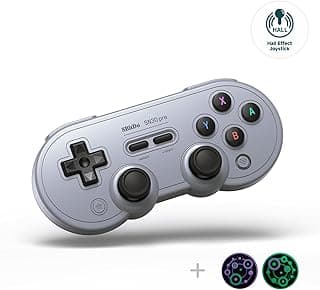
- Hall-effect or magnetic sticks reduce drift and last longer than traditional potentiometer sticks — a meaningful upgrade if you play a lot of shooters or want longevity.
- Look for remappable buttons, back paddles or macro options if you want to customize inputs for competitive play.
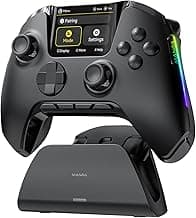
- Consider included extras like interchangeable thumb grips or a charging dock if you value fit and finish.
Battery life and charging options
Battery capacity affects how often you need to recharge and whether you can play through long sessions. Some controllers offer removable batteries, others built-in packs, and a few include wireless charging docks or quick-charge support.
- Look for clear battery capacity specs and realistic runtime estimates — anything between 10–40 hours is common depending on features like vibration and RGB lighting.
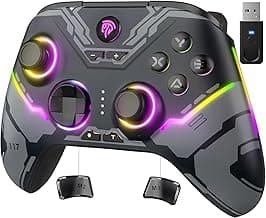
- If you want long runtime with minimal fuss, controllers with larger built-in batteries or a charging dock are convenient. For more long-life and feature comparisons, see our best game controllers. For example, the VOYEE Switch Controller advertises a 1000mAh battery and programmable lighting, which may be useful if you prioritize in-session battery life and customization.
- Also check charge method (USB-C is now standard), and whether the controller supports playing while charging.
Features, durability and value
Decide which extras matter to you: RGB lighting, turbo modes, gyro/motion controls, vibration strength, and build quality. Combine feature needs with warranty and customer support expectations to find the best value.
- Pay attention to warranty length and the manufacturer’s return policy — quality controls vary widely among third‑party brands.
- If you’re on a budget, prioritize core requirements (compatibility, low latency, comfortable ergonomics) over cosmetic features like RGB.
- For advanced users, invest in controllers with hall-effect sticks, remappable back buttons and reliable firmware update support to extend lifespan and adaptability.
FAQ
Which Bluetooth controllers work with Nintendo Switch and PC?
Many modern Bluetooth controllers are built to pair with both Nintendo Switch and Windows PCs, but compatibility varies by model and connection mode. If you want a simple multi‑platform pick, the VOYEE Switch Controller is designed for Switch and PC and advertises one‑key pairing and wake‑up features to simplify switching devices. Always check the product page for explicit Switch/PC support and whether the controller uses Bluetooth, a 2.4GHz dongle, or both. Also confirm button mapping and firmware updates if you plan to use the controller across different games and platforms. See our best pc game controllers roundup for proven Switch/PC-compatible models.
Are Bluetooth controllers good enough for competitive gaming?
Bluetooth controllers can be fine for casual and many serious players, but wired or 2.4GHz dongle connections typically offer the lowest latency for high‑level competition. Look for controllers with Hall effect sticks, reliable triggers, and high polling rates if you want to narrow the latency gap; several modern controllers advertise those features. Keep in mind that vibration, RGB, and motion sensors can add minor delays and use more battery, so disabling unnecessary features can help. If you need the absolute best responsiveness, a wired connection or a proven pro controller remains the safest choice.
How long do Bluetooth game controller batteries typically last?
Battery life depends on capacity and how you use the controller—features like vibration, RGB lighting, and motion sensors consume extra power. Some controllers list capacities such as 1000mAh or larger 1800mAh packs, which generally translate to longer playtimes for the higher‑capacity units. If long sessions matter to you, choose a controller with a larger battery, power‑saving modes, or one that includes a charging dock. Also consider whether the controller supports quick charging or can be used while plugged in for uninterrupted play.
Will a Bluetooth controller pair with Android phones and the Steam Deck?
Yes—most Bluetooth controllers advertise compatibility with Android phones and Steam Deck, but the exact pairing steps can differ by device. Entry‑level and pocket controllers often list broad compatibility with Android, iOS, Steam Deck, and PC, so they’re convenient for mobile gaming. Make sure your phone’s OS version and the controller’s Bluetooth profile match, and check whether you need to enable controller support in the Steam Deck settings. If you plan to switch between several devices, look for a controller that remembers multiple pairings or offers a dedicated pairing button.
Do Bluetooth controllers usually have motion controls and vibration?
Many Bluetooth controllers include vibration motors and 6‑axis motion sensors, but these features vary by model and tier. Midrange and premium third‑party controllers often advertise rumble and motion for more immersive play, while budget pads may omit one or both to save cost and battery. If motion controls or strong vibration are important to you, check the product specs for “6‑axis,” “motion,” or explicit vibration/rotary motor listings. Keep in mind that enabling these features will typically reduce battery life, so factor that into your decision.
Final Verdict
Build quality, consistent Bluetooth connectivity, and stick accuracy separated the strongest Bluetooth controllers from weaker options. Prioritize stable wireless pairing, solid battery life, comfortable ergonomics, and responsive sticks (or Hall-effect sensors) when choosing a controller. The best performers combined reliable connections, durable batteries, and programmable or well-tuned inputs—delivering smoother gameplay and fewer connection or control issues across platforms.
🏆 Best Overall: VOYEE Switch Controller — 1000mAh Programmable RGB Wireless Pro
💰 Best Budget: XBOX Wireless Gaming Controller — Bluetooth USB-C Textured Grip
⭐ Best Premium: EasySMX X05 Wireless Controller — Hall Effect & Turbo