Buying Guide
Platform compatibility and game support
Make sure the controller works with the console or PC and the game you plan to play. Controllers can vary between legacy consoles (PS3/Xbox 360), current consoles, and PC-compatible dongle or Bluetooth solutions. If you plan to play Clone Hero or PC ports, look for explicitly listed PC support and a stable USB dongle or Bluetooth pairing. If you need help choosing connectivity options, see our best usb music controllers guide.
- Check the product listing for supported systems and any required drivers or dongles.
- If you need official console support (for example, Xbox or PlayStation), choose a controller that lists that console by name rather than relying on adapters.
- Example: the PDP RiffMaster is marketed for Xbox Series X|S, Xbox One and Windows PCs, which can simplify setup if you're on those platforms.
Controls, fret layout and responsiveness
Beginners benefit from a controller with clear, well-spaced frets and a responsive strum bar. Look for smooth fret buttons and a strum bar that registers consistently; awkward spacing or sticky buttons makes learning frustrating.
- Five-fret versus six- or more: most modern rhythm games expect a five-fret layout—confirm the controller matches the game you’ll play.
- Check reviews for comments on button travel and strum-bar accuracy; tactile feel matters for long practice sessions.
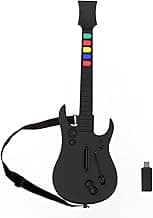
- For a reliable all-around controller with a standard five-key layout, consider the DOYO Wireless Controller, which is listed for PC and PS3 and notes a five-key configuration.
Connectivity: wireless vs wired and latency
Decide whether you want wireless freedom or the slightly simpler setup of a wired controller. Wireless models use USB dongles or Bluetooth; each can introduce latency if poorly implemented. For recommendations on low-latency wireless options, check our best wireless music controllers guide; for beginners, a stable connection with minimal input lag is more important than brand-new wireless features.
- USB dongles typically offer plug-and-play simplicity on PC and lower latency than generic Bluetooth on some setups.
- If you see reports of dropouts or delay in reviews, choose a different model—consistent timing is crucial for rhythm games.
- Rechargeable batteries and a clear charging method are useful on wireless models so you don’t lose practice time.
Comfort, size and mounting (straps, weight)
Controllers with comfortable straps and ergonomic balance let beginners play longer without fatigue. Weight distribution affects how the controller sits while standing; thin, flimsy straps or heavy neck bias can make practice uncomfortable.
- Look for adjustable straps and a neck shape that allows easy access to the frets and strum bar.
- If you’ll practice sitting, confirm the controller is comfortable on your lap; if standing, prioritize secure strap attachments.
- Product photos and user reviews usually indicate whether a controller feels balanced during play—use those to judge comfort before buying.
Budget, durability and extra features
For beginners, aim for a controller that balances cost and build quality: avoid the cheapest options if they show reliability issues, but you don’t need the top-tier pro models yet. Consider durability (sturdy plastics, solid buttons) and extras like audio jacks, RGB lighting, or companion grips only if they add clear value to your setup. For price-focused picks, see our best budget guitar controller roundup.
- Compare warranties and return policies—easy returns are helpful if the controller has an unexpected defect.
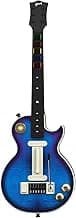
- For a budget-friendly, multi-platform option, the CRKD Gibson Les Paul controller is positioned as a lower-cost alternative and may suit new players prioritizing price.
- If extra features matter (lighting, mobile compatibility), list your must-haves and prioritize controllers that include them without compromising core playability.
FAQ
What is the best beginner guitar controller to start with?
Most beginners want a controller that's easy to set up, comfortable to hold, and compatible with their console or PC. The PDP Riffmaster is a solid starter because it's officially licensed for Xbox and works well with Windows, offers rechargeable power, and has features aimed at new players. Its familiar layout and simple controls reduce the learning curve compared with niche or DIY options. Check platform compatibility with your console or PC build before buying to avoid surprises.
Do I need a special adapter to use a guitar controller with PC?
Not always — many controllers connect to PC via a 2.4 GHz USB dongle, Bluetooth, or a wired USB cable. Some models include their own dongle that plugs straight into a USB port, while others rely on native Bluetooth drivers or a wired connection. If your PC only has USB‑C ports you may need a small adapter for older USB‑A dongles, so check the product listing. For plug‑and‑play simplicity on Clone Hero and similar software, a included wireless dongle or a wired USB option is usually the easiest route.
Are Clone Hero-compatible controllers good for beginners?
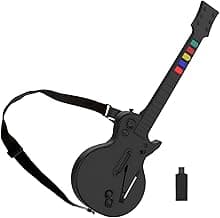
Yes—Clone Hero-compatible controllers are often great for beginners because they open up a large library of songs on PC without buying legacy consoles. The NBCP Guitar Hero Controller is a common choice for Clone Hero players thanks to its plug‑and‑play dongle and broad game support. If you want a broader selection of game-ready options, see our best music game controller guide. Beginners should focus on controllers with low input lag, sturdy fret buttons, and easy setup to avoid frustration while learning. Always confirm Clone Hero or PC compatibility in the product description before purchasing.
How much should I expect to spend on a beginner guitar controller?
Most beginner-friendly controllers fall in a range from roughly $60 up to about $115 depending on features and build quality. Basic wired or wireless models with simple dongles are at the lower end, while licensed, multi‑platform, or better‑built guitars cost more. Decide whether comfort, rechargeable batteries, or cross‑platform support are worth the extra cost for your needs. Check return policies and reviews so you can test playability and feel without a big risk.
What features matter most when buying a beginner guitar controller?
Prioritize platform compatibility (Guitar Hero, Rock Band, Clone Hero) and how the controller connects to your system. Comfortable strap ergonomics, responsive fret buttons, and a solid strum bar greatly reduce frustration during practice. Convenience features like rechargeable batteries, an audio jack, or a detachable neck can be helpful but aren’t essential for learning the basics. Read user reviews for durability and latency feedback before committing to a model.
Final Verdict
After testing the top beginner guitar controllers, the strongest stood out for reliable fret and strum response, comfortable neck ergonomics, and hassle-free PC connectivity. For a broader comparison across price points and features, refer to our best guitar controllers guide. Buyers should prioritize consistent button feel, stable wireless dongles or USB support, and an adjustable strap for extended sessions. The best performers delivered dependable inputs, solid build feel, and broad game compatibility so beginners can focus on learning, not hardware troubleshooting.
🏆 Best Overall: DOYO Wireless Controller for PC & PS3 — 5-Key Guitar
💰 Best Budget: CRKD Gibson Les Paul Guitar Controller — Multi-Platform
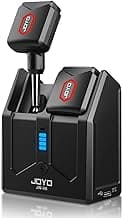
⭐ Best Premium: CRKD NEO S Controller — 5-Fret Grip Attachment